Tests
The Tests section displays the test results associated with a review.
Tests can be provided by:
-
Workflows that include configured tests. To learn more, see Tests.
-
Continuous integration (CI) systems integrated with P4 Code Review. To learn more, see Automated testing for reviews.
When tests are available for a review, the test results are displayed in the Information panel for the current review version.
Test results
The Tests section displays a summary of test activity for the selected review version. Switching review versions can change the tests and results displayed.
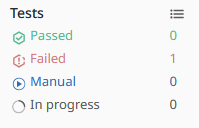
The test summary includes:
| Test status |
Description |
|---|---|
|
Passed |
The number of tests that passed. |
|
Failed |
The number of tests that failed. Failed tests might prevent review approval depending on workflow configuration. To learn more about approval requirements, see Approval rules. |
|
Manual |
The number of On Demand tests that can be run manually. |
|
In Progress |
The number of tests currently running. |
Use the test summary to determine the current testing status of the review.
To learn more about review versions, see Review versions.
View test details
To view detailed test information:
-
Open the review.
-
Locate the Tests section in the Information panel.
-
Select Show test details.
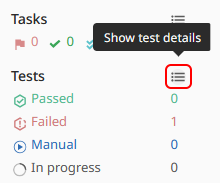
The test details view displays information about the tests associated with the selected review version.
If a continuous integration system provides a URL when reporting results, the test result is linked to that URL.
If a test result includes messages, select Show more next to the test to display additional information.
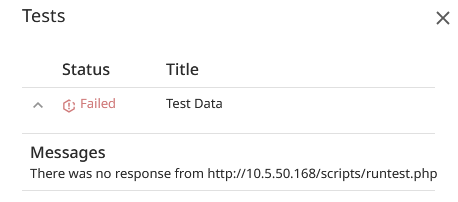
To learn more about the Information panel, see Information panel.
Workflow tests
Workflows can be configured to run tests automatically as part of the review process.
When a review is associated with a workflow that contains tests, the workflow test results are displayed in the Tests section.
Workflow tests can be configured to:
-
Run automatically.
-
Run on demand.
-
Participate in approval workflows.
The available tests depend on the workflow associated with the review. To learn more, see Tests.
Test result reuse
When the content of a review is unchanged between review versions, tests are not rerun because the reviewed files have not changed.
In this situation, P4 Code Review displays the earlier test results and labels them with (Copy).
If required, copied test results can be rerun manually.
To learn more about review versions and version history, see Review versions.
Continuous integration (CI) integration
P4 Code Review can display results from integrated continuous integration systems.
When a CI system reports test results for a review, those results are displayed in the Tests section.
If the CI system provides a URL with the test results, the test entry includes a link to the external system.
Selecting the link opens the test results in the associated CI system.
Test reruns
Completed workflow tests can be rerun for the latest version of a review.
To rerun a test:
-
Open the review.
-
Select Show test details.
-
Locate the completed test.
-
Select Rerun test.
The test is rerun against the latest version of the review.
The Rerun test button is only available when:
-
You are logged in to P4 Code Review.
-
You are viewing the latest review version.
-
The test was started by a workflow.
-
The test is not currently running.
When a test rerun is started, all Run test and Rerun test buttons are temporarily disabled while P4 Code Review starts the test and checks for other running tests.
On-demand tests
Some workflow tests are configured to run only when manually requested.
These tests are displayed in the test summary as Manual tests.
To run an on-demand test:
-
Open the review.
-
Select Show test details.
-
Locate the test.
-
Select Run test.
The test is run against the latest version of the review.
The Run test button is only available when:
-
You are logged in to P4 Code Review.
-
You are viewing the latest review version.
-
The test was started by a workflow.
The Run test button is not available for tests configured directly on a project.
Blocking tests
Depending on workflow configuration, test results can affect the review process.
Workflow tests can be used to validate review content before a review is approved or committed.
Reviewers should investigate failed tests before approving a review.
To view details for a failed test:
-
Open the review.
-
Select Show test details.
-
Locate the failed test.
-
Review any available messages.
-
Select Show more to display additional test output when available.
To learn more about approval requirements and approval restrictions, see:
Private project tests
When a test from a private project is included in a review, P4 Code Review respects the permissions of the private project.
Users who do not have permission to view the project see the test listed as Private project rather than the project name.
Next steps
-
Files and diffs - Learn how to inspect files, review diffs, and compare review versions.
-
Comments, tasks, and checklists - Learn how to discuss changes, manage tasks, and review checklist results.
-
Review page - Learn about review actions, notifications, jobs, and deployment information.
-
Reviewers and approvals - Learn how reviewers, voting, and approvals work.