AI Configuration (System information)
The AI Configuration tab enables administrators to manage AI features and control which AI vendors, models, and prompts are available throughout P4 Code Review.
P4 Code Review includes AI-powered features that can be used for code analysis, comment assistance, checklist validation, and API integrations.
Administrators can configure organization-managed AI vendors, AI models, and AI prompts for use across P4 Code Review. Depending on your organization's AI policies, administrators can also allow users to configure personal AI vendors in their user profile. Personal AI vendor settings override administrator-managed AI vendor settings for that user.
For more information about configuring personal AI vendors, see Per-user AI vendors (bring your own key)
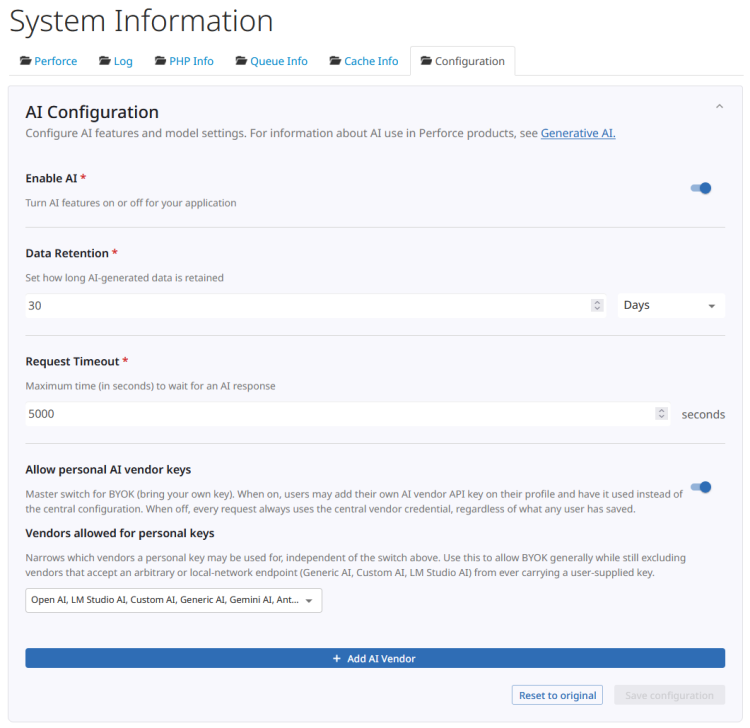
AI configuration settings
The AI Configuration section controls AI availability, retention settings, request timeout values, and personal AI vendor access.
Use the following settings to manage AI functionality in P4 Code Review:
-
Enable AI - Enables or disables all AI-powered features in P4 Code Review.
-
Data Retention - Specifies how long AI-generated summaries are retained before being removed by the AI summary cleanup process.
-
Request Timeout - The maximum time, in seconds, that P4 Code Review will wait for an AI response. The default value is 30 seconds.
-
Allow personal AI vendor keys - Controls whether users can configure their own AI vendors and API keys.
-
Vendors allowed for personal keys - Controls which AI vendors users can configure with personal API keys.
-
Add AI Vendor - Click to add an AI vendor that is available to all P4 Code Review users. The configuration options displayed depend on the AI vendor you select. For instructions on configuring a specific AI vendor, see:
To learn more about configuring AI vendors, models, prompts, and AI-powered features, see Configure AI.
Personal AI vendors
Personal AI vendor settings override administrator-managed AI vendor settings for that user. If a user does not have a Personal AI vendor configured for a vendor type, the administrator-managed AI vendor is used instead.
When Allow personal AI vendor keys is enabled, users can configure personal AI vendors from My Profile > AI Vendors. Personal AI vendor settings override administrator-managed AI vendor settings for that user.
Administrators can restrict which AI vendors users are allowed to configure by selecting vendors in Vendors allowed for personal keys. Only the selected vendors are available on the user's AI Vendors page.
When Allow personal AI vendor keys is disabled, the AI Vendors page is not available to users.