Generic AI model integration for P4 Code Review
Use Generic AI with P4 Code Review to provide AI-powered features such as code analysis and AI-assisted comments using an AI service that is not natively supported by P4 Code Review. Generic AI vendors can be used with external or internally hosted AI services that expose a compatible API endpoint.
Generic AI can be configured as either:
-
An administrator-managed AI vendor available to users throughout the organization. To learn more, see Configure AI.
-
A personal AI vendor configured by an individual user. To learn more, see Manage AI Vendors.
When to use a Generic AI model
Use Generic AI if:
-
Your AI provider is not listed as a built-in vendor (OpenAI, Anthropic Claude, Google Gemini, Azure OpenAI, LM Studio).
-
You use a self-hosted, internal, or third-party AI service, or an AI gateway or proxy.
-
Your AI service provides an OpenAI-compatible chat completions API. The request and response formats are shown below.
If your AI service uses a different request or response format, use a custom AI adapter instead. See Custom AI adapter in P4 Code Review.
To integrate a Generic AI model with P4 Code Review
-
Obtain API access to your AI service.
-
Configure the Generic AI vendor in P4 Code Review.
Obtain API access
Before configuring Generic AI:
-
Create an account with your AI provider, or obtain access to your internal AI service.
-
Generate an API key, if your service requires one.
-
Find the chat completions endpoint URL for your service, for example:
https://ai.example.com/v1/chat/completions
Note the name of the model you want to use.
Configure the Generic AI vendor
Configure a generic AI vendor by creating an administrator-managed AI vendor or a personal AI vendor.
Administrator-managed AI vendor
To create an administrator-managed AI vendor:
-
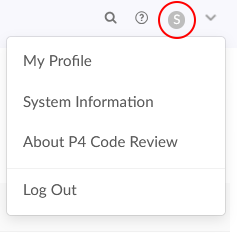
In the top right corner of P4 Code Review, click your user ID, then click System Information.
-
Click Configuration, then expand AI Configuration.
-
Turn on Enable AI, then click Save configuration.
-
In the AI Vendor section, click Add AI Vendor.
-
Select Generic AI as the AI vendor.
-
Configure the generic AI vendor. For a full list of the settings to configure, see Generic AI vendor configuration settings.
-
Click Add AI Vendor.
Personal AI vendor
To create a personal AI vendor:
-
In the top right corner of P4 Code Review, click your user ID, then click My Profile.
-
Click the AI Vendors tab.
-
Select Generic AI as the AI vendor.
-
Configure the generic AI vendor. For a full list of the settings to configure, see Generic AI vendor configuration settings
-
Click Add AI Vendor.
Generic AI vendor configuration settings
-
API Key: Enter your API key. If your service does not require a key, enter a placeholder value, for example:
noneThe AI Model list cannot load without an API key value. -
API Endpoint: Enter the API endpoint URL for your AI service. See below for more information on configuring this setting.
-
AI Model: Select the model from the list. If your service does not provide a model list, type the model name manually.
-
AI Summary Header Value: Enter the value shown as the AI service name in the header of an AI-generated summary.
-
Default Prompt: Enter the default prompt used to generate the AI code analysis response for this vendor.
-
Character Limits: Enter the minimum and maximum characters required for AI processing.
-
Prompts: (Optional) Change the prompts used by Generic AI. These prompts control the options available in the AI Assistant for comments feature. You can update the following:
-
Improve Comment
-
Summarize Text
-
Fix Spelling and Grammar
-
Custom Prompt
-
-
Enabled: (Only available in My Profile) Controls whether the vendor configuration is available for AI-powered features. Disable the vendor if you want to retain the configuration without making it available for use. This option is available in the personal AI vendor setup only.
Configure API Endpoint
Enter the full chat completions URL, for example:
https://ai.example.com/v1/chat/completions
P4 Code Review sends requests to this URL exactly as entered and does not append additional path information.
https://ai.example.com/v1If you enter only the base URL, the AI Model list might still load and a user's Test connection check might succeed, but AI requests fail.
The API Endpoint is contacted from the P4 Code Review server. Ensure that the server can reach your AI service.
Request and response format
When an API key is set, P4 Code Review sends an OpenAI-compatible chat completions request:
HTTP
POST <your API Endpoint>
Content-Type: application/json
Authorization: Bearer <your API key>
JSON
{
  "model": "<AI Model>",
  "messages": [
    {
      "role": "user",
      "content": "Explain the following code of the file example.c: ..."
    }
  ]
}
Your AI service must return a response in which the generated text is provided in: choices[0].message.content
For example:
{
  "choices": [
    {
      "index": 0,
      "message": {
        "role": "assistant",
        "content": "This function checks whether ..."
      }
    }
  ]
}
If an API key is configured, P4 Code Review sends OpenAI-compatible chat completions requests, including the model name and Authorization header shown above. If no API key is configured, P4 Code Review uses a simplified request format. To ensure consistent behavior and to allow model validation and connection testing, configure an API key or a placeholder value even if your AI service does not require authentication.
Otherwise, AI Checklist results cannot be processed correctly.
How the model list and Test connection work
Model list: P4 Code Review requests GET <base URL>/v1/models using the API Endpoint to determine the base URL. If your service does not provide this route, type the model name manually.
Test connection (on a user's AI Vendors tab): P4 Code Review first attempts to retrieve the model list. If no models are returned, it sends a minimal chat completions request to the configured API Endpoint. The test succeeds if the service accepts that request.