AI Assistant for comments
The AI Assistant helps you improve review comments using AI-powered prompts. The prompts available in the AI Assistant depend on the AI vendors available to your account. This can include administrator-managed AI vendors and personal AI vendors.
To learn more about personal AI vendor configuration, see Manage AI Vendors.
On this page:
AI Assistant options
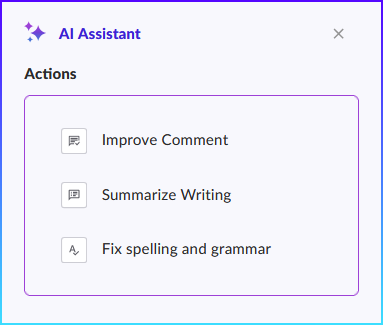
The AI Assistant supports the following actions:
| Feature | Description |
|---|---|
|
Improve Comment |
Improves the clarity, readability, and professionalism of a comment while preserving its original intent. |
|
Summarize Text |
Creates a concise summary while retaining important context. |
|
Fix Spelling and Grammar |
Corrects spelling, grammar, punctuation, and sentence structure issues. |
|
Custom Prompt |
Runs a user-defined prompt. This prompt is not configured by default. Configure a custom prompt if you want to make it available in the AI Assistant. |
How AI Assistant prompts work
The AI Assistant groups available prompts by AI vendor.
The following example shows how prompts are grouped by AI vendor in the AI Assistant menu:
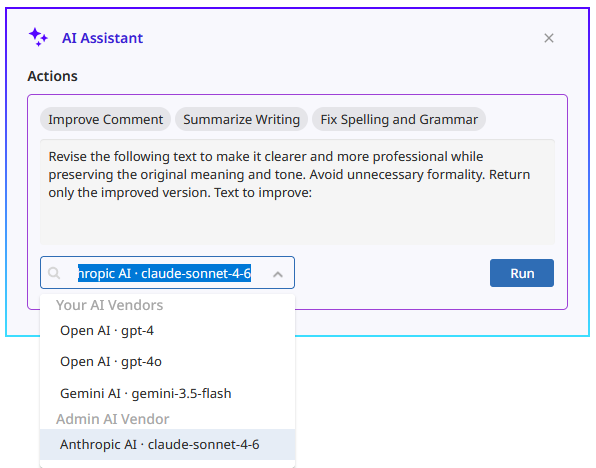
Only prompts configured for an AI vendor are displayed in the AI Assistant menu. If a prompt is not configured, it is hidden from users.
When working with comments, users can select a prompt from the available AI vendor options.
To learn more about configuring personal AI vendors, see Manage AI Vendors.
Configure AI Assistant prompts
By default, each AI Assistant option uses a predefined prompt.
Administrators can configure prompts for administrator-managed AI vendors. Users can also configure prompts for personal AI vendors as part of their AI vendor configuration.
The following prompt types are available:
-
Improve comment - Improves the clarity, readability, and professionalism of a comment while preserving its original intent.
-
Summarize text - Creates a concise summary that retains key points and important context.
-
Fix spelling and grammar - Corrects spelling, grammar, punctuation, and basic sentence structure issues.
-
Custom prompt - Provides a custom AI Assistant option using a prompt that you define. This setting is empty by default.
To preview the default prompt text, see Default prompts.
Disable AI Assistant options
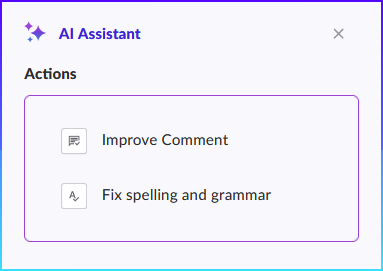
If a prompt value is empty, the corresponding AI Assistant action is not displayed in the AI Assistant menu.
For example, if the Summarize Text prompt is not configured for an AI vendor, the Summarize Text option does not appear for that vendor in the AI Assistant.
Default prompts
The following prompts are provided by default:
-
Improve comment - "You are a writing assistant helping users improve short comments or messages. Please revise this input text to make it clearer, more professional, and appropriate for the intended context. Preserve the original intent and tone unless it is unclear or inappropriate. If the comment is vague, suggest a more specific version. Avoid making the text overly formal unless necessary. Return only the improved version of the text, without explanations. For this statement:"
-
Summarize text - "You are a summarization assistant helping users condense their writing into a clear and concise summary. Please summarize this text in a way that preserves the key points and intent. Use plain language and keep the summary brief and easy to understand. If the original text includes action items, decisions, or important context, make sure those are included in the summary. Return only the summary, without explanations or commentary. For this statement:"
-
Fix spelling and grammar - "You are a writing assistant helping users correct spelling, grammar, and punctuation in short comments or messages. Please correct any spelling, grammar, punctuation, or basic sentence structure issues. Do not change the tone, intent, or style unless necessary to fix the grammar. Keep the revised version natural and readable. Return only the corrected version of the text, without explanations. For this statement:"
-
Custom prompt - This prompt is empty by default. Add your own prompt to provide custom AI Assistant functionality. For example: "Convert this text into Spanish."