LM Studio integration for P4 Code Review
Use LM Studio with P4 Code Review to provide AI-powered features such as code analysis and AI-assisted comments using locally hosted AI models. Unlike cloud AI providers, LM Studio runs AI models locally and does not require an external API key.
LM Studio can be configured as either:
-
An administrator-managed AI vendor available to users throughout the organization. To learn more, see Configure AI.
-
A personal AI vendor configured by an individual user. To learn more, see Manage AI Vendors.
Recommended models
LM Studio supports many local AI models. The following models have been tested with P4 Code Review:
-
lmstudio-community/gemma-3-1B-it-qat-GGUF -
lmstudio-community/Qwen3-1.7B-GGUF -
lmstudio-community/DeepSeek-R1-Distill-Llama-8B-GGUF -
lmstudio-community/Meta-Llama-3.1-8B-Instruct-GGUF
Before you begin
Before configuring LM Studio:
-
Download and install LM Studio.
-
Open LM Studio.
-
Download or load a supported AI model.
-
Enable the Local Server option.
-
Record the API endpoint URL. For example:
http://localhost:1234/v1
Configure AI vendors
Configure an AI vendor by creating either an administrator-managed AI vendor or a personal AI vendor.
You configure AI vendors on the Configuration tab of the System Information page. You can add up to 10 AI vendors. One of them is the default vendor, which P4 Code Review uses for AI actions unless a user chooses a different one.
Administrator-managed AI vendor
To create an administrator-managed AI vendor:
-
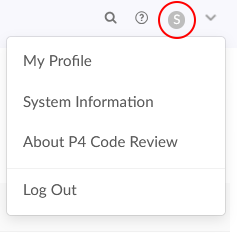
In the top right corner of P4 Code Review, click your user ID, then click System Information.
-
Click Configuration, then expand AI Configuration.
-
Turn on Enable AI, then click Save configuration.
-
In the AI Vendor section, click Add AI Vendor.
-
Select LM Studio as the AI vendor.
-
Configure the vendor settings.For a full list of the settings to configure, see LM Studio configuration settings.
-
Click Add AI Vendor
The vendor is saved immediately.
Personal AI vendor
To create a personal AI vendor:
-
In the top right corner of P4 Code Review, click your user ID, then click My Profile.
-
Click the AI Vendors tab.
-
Click Add Vendor.
-
For a full list of the settings to configure, see LM Studio configuration settings.
-
Click Add AI Vendor.
The vendor is saved immediately.
LM Studio configuration settings
Configure the following settings:
-
API key: Leave this field blank. An API key is not required when using LM Studio.
-
API Endpoint: Enter the LM Studio server URL. For example:
http://localhost:1234/v1 -
AI Model: Enter the LM Studio model name. For example:
-
lmstudio-community/gemma-3-1B-it-qat-GGUF
-
lmstudio-community/Qwen3-1.7B-GGUF
-
- AI Summary Header Value: (Optional) Enter the name displayed in AI-generated summaries.
-
Default Prompt: Enter the default prompt used for AI code analysis.
-
Character Limits: The minimum and maximum number of characters that can be sent for AI processing.
-
Prompts: (Optional) Change the prompts sent to LM Studio. These prompts control the options available in the AI Assistant for comments feature. You can update the following:
-
Improve Comment
-
Summarize Text
-
Fix Spelling and Grammar
-
Custom Prompt
-
-
Enabled: (My Profile only) Controls whether the vendor configuration is available for AI-powered features. Disable the vendor if you want to retain the configuration without making it available for use.
Using the LM Studio local server
LM Studio uses a local server to process AI requests.
Before using AI-powered features:
-
Start LM Studio.
-
Load a supported model.
-
Enable the Local Server option.
-
Verify that the configured endpoint is reachable.
LM Studio must be running and the local server must be enabled for AI-powered features to work. If the server is unavailable, AI requests will fail.
Migrating from config.php-based AI configuration
AI is configured only in System Information or My Profile.
If your SWARM_ROOT/data/config.php file contains an ai_review block from an earlier release, its values are copied into the Configuration tab the first time you open it.
After that, changes to the ai_review block in config.php have no effect.
Remove the ai_review block from config.php once your AI configuration is saved in System Information or My Profile.