Helix DAM 2024.1 release notes
Released: March 2024
On this page:
Release highlights
Improved asset view
Improvements to the asset view help you work more efficiently.
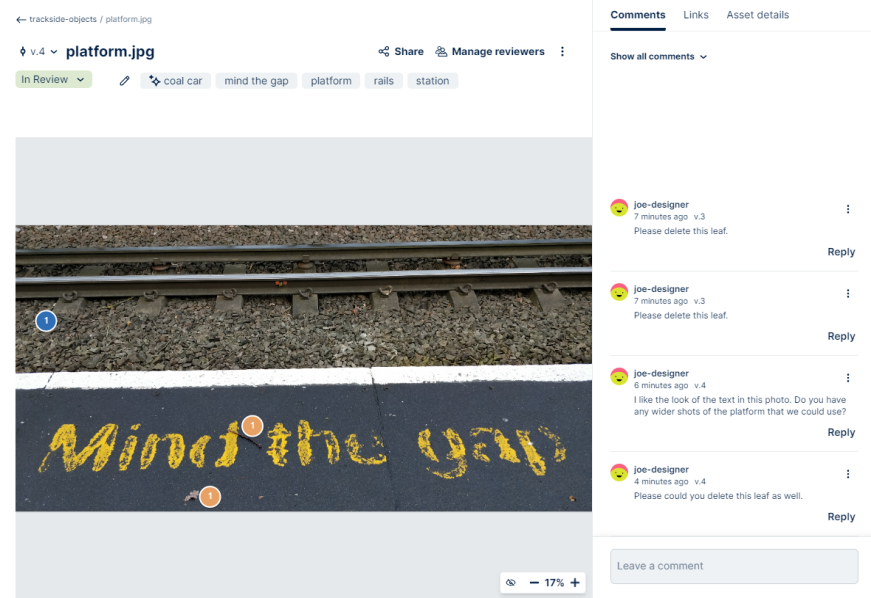
Version list
Use the Version list next to the asset filename to work with or download a specific version. The Versions tab was removed.
To learn more, see View asset versions.
Links tab
Work with asset links on the Links tab. The Info tab was removed.
To learn more, see Links
Asset details tab
View asset information and metadata on the Asset details tab. The Info tab was removed.
To learn more, see View asset details and metadata.
Share and Manage reviewers actions
Access the Share and Manage reviewers actions in the asset view instead of the asset menu.
To learn more, see Actions available when viewing an asset from a project.
Regenerate preview images
You can now force Helix DAM to regenerate an asset preview image. You can regenerate previews if Helix Search failed to create a preview image when the asset was originally uploaded or to revert to the preview image generated by Helix Search.
To learn more, see Regenerate an asset preview.
Copy assets to folders and filter destinations
You can now copy assets to folders. To find and select the correct destination for the copied asset in the Copy to dialog box, you can filter the list by project, collection, and folder.
To learn more, see Copy assets to other collections or folders.
Release details
Before you install or upgrade: P4 DAM is built on top of Perforce TeamHub. To install or upgrade P4 DAM, you use the Perforce TeamHub packages. Upgrading is usually a zero-downtime operation and can be performed on a live system. Before upgrading, review the following information, including any release-specific upgrade instructions.
Enhancements
- Improved the layout and usability of the asset view. Added a version list next to the asset name. Added the Share and Manage reviewers actions to the main view. Added a Links tab for working with asset links and an Asset details tab that displays asset information and metadata. Improved the usability of the Comments tab.
- Regenerate preview images for assets.
- Copy assets to folders.
- Added support for Helix Core 2023.2.
- Upgraded Redis to 7.2.4.
Bug fixes
- Important security fixes.
- Non-administrator users could manage tags on assets from the home page.
- Browsing did not work for assets in Helix Core depots with custom storage location.