Code reviews
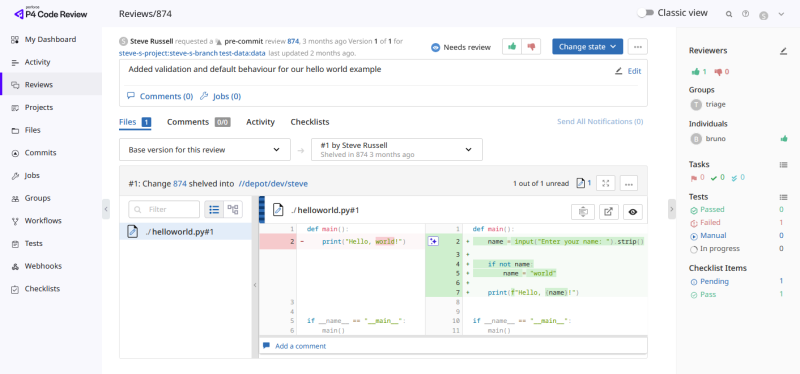
Code reviews help teams improve code quality by allowing other developers to review changes before or after they are committed to the P4 Server. Reviewers can provide feedback, raise concerns, suggest improvements, and approve changes for submission.
Why use code reviews?
Code reviews help teams:
-
Identify issues before changes are submitted.
-
Improve code quality and consistency.
-
Share knowledge across the team.
-
Ensure important changes are reviewed by the appropriate people.
How code reviews work
A typical code review process follows these steps:
-
Create a review from a changelist.
-
Add reviewers to evaluate the changes.
-
Reviewers examine the files, add comments, and vote on the review.
-
The author updates the review if changes are required.
-
The review is approved, rejected, or archived.
-
Approved changes can be committed to the P4 Server.
Review requirements can vary between projects. For example, reviews can require approval from specific reviewers, moderators, or workflows before they are completed.
Checklists
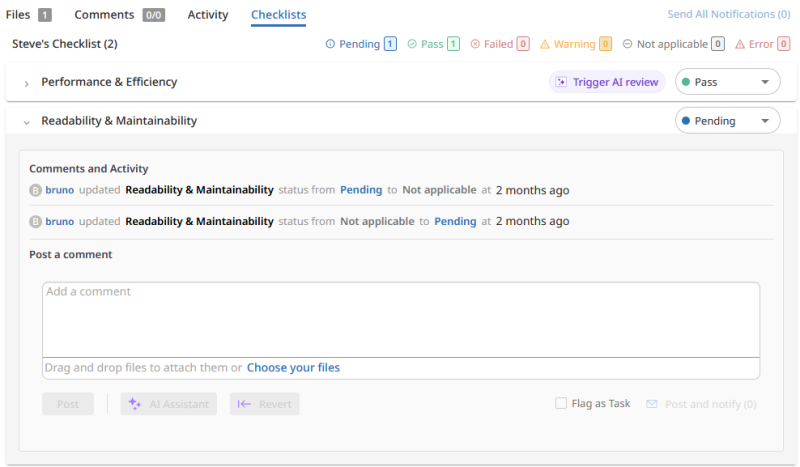
Reviews can include checklists to ensure that required validations are completed before a review is approved. Checklist items can be reviewed manually or evaluated by AI, depending on how the checklist is configured.
Learn more
Use the following pages to learn about code reviews:
-
Overview - Review concepts, review models, review states, and the review lifecycle.
-
Create and update reviews - Start reviews, update reviews, add changelists, and work with shelves.
-
Reviewers and approvals - Learn about authors, reviewers, required reviewers, moderators, votes, and approvals.
-
Use the review interface - Navigate reviews, work with files and diffs, manage comments and tasks, and view test results.
-
Review processes - Learn about common review processes and keyword-based reviews.
-
Advanced concepts - Review versions, internal review representation, and advanced review behavior.