Code reviews overview
On this page:
What are code reviews?
Code reviews allow developers to review changes and provide feedback before or after those changes are committed to the P4 Server.
Code reviews help teams enforce coding standards, identify defects earlier, share knowledge across the team, and improve the maintainability and quality of the codebase.
Review terminology
The following terms are used throughout the code review documentation:
|
Term |
Description |
|---|---|
|
Review |
A request to evaluate a set of code changes. |
|
Author |
The user associated with the review and its changes. To learn more, see Authors. |
|
Reviewer |
A user who participates in a review by reviewing changes, commenting, or voting. To learn more, see Authors. |
|
Required reviewer |
A reviewer whose approval is required before a review can be approved. To learn more, see Authors. |
Review participants
A review can involve multiple participants:
-
Authors create and update reviews.
-
Reviewers examine the changes and provide feedback.
-
Required reviewers must approve the review before it can be approved.
-
Moderators can control review approvals and, depending on project configuration, may be required to approve or reject reviews.
Review lifecycle
A typical review follows these steps:
-
Create a review from a changelist.
-
Add reviewers.
-
Reviewers examine the changes, comment on files, and vote on the review.
-
The author updates the review if changes are required.
-
The review is approved, rejected, or archived.
-
Approved pre-commit reviews can be committed to the P4 Server.
To learn how reviews are created, updated, approved, and committed, see Review process.
Review models
P4 Code Review supports two review models: pre-commit and post-commit. The model you choose depends on when you want code review to occur in your development process.
Pre-commit reviews
In the pre-commit model, code is reviewed before it is committed to the P4 Server. This allows reviewers to identify issues early and helps ensure that changes are approved before they become part of the codebase. P4 Code Review uses shelved changelists to manage pre-commit reviews.
To learn how to work with shelves and review files, see Work with shelves and review files.
Post-commit reviews
In the post-commit model, code is committed before the review takes place. This allows developers to submit changes without waiting for review approval and does not require shelved changelists.
Choosing a review model
Use a pre-commit review when changes must be reviewed before submission.
Use a post-commit review when teams prioritize rapid submission and perform reviews after code has already been committed.
Review states
Every review has a state that indicates its current status.
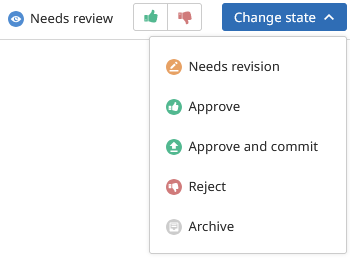
|
State |
Description |
|---|---|
|
Needs Review |
The review is active and waiting for feedback from reviewers. |
|
Needs Revision |
Reviewers have requested changes and the review author must update the review before it can proceed. |
|
Approved |
The review has been successfully completed and approved. Depending on the review model, the associated changes may still need to be committed. |
|
Rejected |
The review has completed and the changes should not be submitted. |
|
Archive |
The review has been set aside without being approved or rejected. Archived reviews can be retained for reference or future work. |
To learn how review states, approvals, reviewer requirements, and moderator approvals work together, see Reviewers and approvals.
Review concepts
Review versions
A review can have multiple versions. Each time the content of a review is updated, P4 Code Review creates a new review version. This allows reviewers to compare changes over time and review the evolution of the work
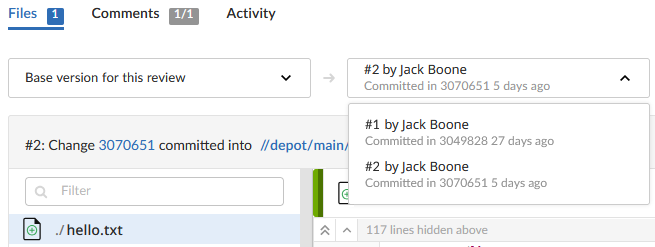
To learn more about review versions, version history, and version comparisons, see Advanced concepts.
Voting
Reviewers can vote on a review to indicate whether they support or oppose the proposed changes. Votes help communicate review feedback and contribute to the review's overall approval status.
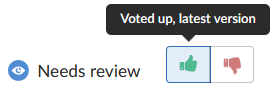
To learn more about voting, stale votes, and approval requirements, see Reviewers and approvals.
Approval
A review can be approved when its approval requirements have been satisfied. Approval requirements vary depending on project configuration and can include reviewer votes, required reviewer participation, moderator approval, workflow rules, or checklist requirements.
To learn more about approval requirements, required reviewers, moderator approvals, and approval restrictions, see Reviewers and approvals.
Next steps
-
Create and update reviews - Learn how to start reviews, add changelists, and work with shelves.
-
Reviewers and approvals - Learn about reviewers, moderators, voting, and approval requirements.
-
Code review features - Learn how to navigate and review changes in P4 Code Review.
-
Review process - Learn about common review processes and advanced review scenarios.
-
Advanced concepts - Learn about review internals, version management, and review architecture.