




This section describes the core classes in the public interface of the Objective Grid for Microsoft .NET control. All of the classes are contained in the Stingray.Grid namespace.
| GridControl | The GridControl class represents and embodies an Objective Grid for Microsoft .NET grid control. The GridControl custom control is added to the Visual Studio .NET toolbox when Objective Grid for Microsoft .NET is installed. When a GridControl is dragged onto a Windows Form, an instance of the GridControl class is created. The GridControl class contains a rich public interface, a rich set of public events, a number of properties, and a customizable virtual method interface. |
| Cell | The Cell class represents a single cell in the grid. A cell is referenced by a row offset and a column offset. The Cell class contains properties for the cell's row, column, text, and style. |
| Range | The Range class represents a range of cells in the grid. The Range class can be used for operations that apply to a group of cells. |
| Style | The Style class is central to formatting cells in the grid. A style object can be seen as an object that completely defines a cell. This means that the style object has all the information necessary for the grid object to draw the cell and manage its interaction with users. This information includes the font used to draw the cell, the color of the cell's interior, the size of the font, the value displayed, and the type of control in the cell. Style objects for each cell are stored internally by the grid. The format of a grid cell can be changed programmatically through the manipulation of the style property of the cell. |
| Param | The Param (short for Parameter) class stores all data necessary for persisting the state of a grid object. Parameter objects can be stored in documents and serialized, or used as members of other classes. Parameter objects can also be shared between grid objects. |
The Cell class represents a single cell in the grid control. A cell is referenced using row and column offsets into the grid. By default, the grid reserves the first row for column headers and the first column for row headers, as shown in Figure 1. The header row and column are numbered row 0 and column 0, respectively.
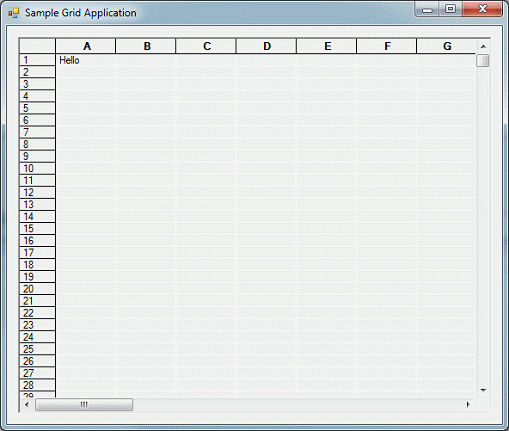
In Figure 1, the cell at row 1 and column A has row and column offsets 1, 1. This cell is referenced in source code as follows:
C#:
Cell cell = gridControl1[1,1]; cell.Style.Value = "Hello"; |
Visual Basic:
Dim cell As Cell cell = GridControl1(1, 1) cell.Style.Value = "Hello" |
The Cell class is included in the Stingray.Grid namespace. To reference the Cell class as shown above, this namespace must be opened for use as follows:
C#:
using Stingray.Grid; |
Visual Basic:
Imports Stingray.Grid |
Instances of the Cell class can be obtained only through an instance of the GridControl class. Once created, a cell instance maintains its association with the GridControl from which the cell was obtained. This allows the Cell instance to be used to change the properties of the referenced cell in the referenced grid. Cell instances can be used to change the style, text, formula, and other properties of a given grid cell. For example, the following code changes the cell at row 1 and column 2 so that it is read-only and is displayed using the Courier font.
C#:
cell = gridControl1[1,2];
Style style = gridControl1[1,2].Style;
style.ReadOnly = true;
style.TextFont = new OGFont("Courier", 10, 0);
style.Value = "World";
cell.Style = style;
|
Visual Basic:
cell = GridControl1(1, 2)
Dim style As Style
style = GridControl1(1, 2).Style
style.ReadOnly = true
style.TextFont = New OGFont("Courier", 10, 0)
style.Value = "World"
cell.Style = style
|
For efficiency, changes to individual attributes of the cell style are not applied to the grid cell immediately. Instead, style changes must be made as shown above. All desired changes to the cell style are performed in sequence. These changes are not visible in the grid cell until the cell style is applied back to the cell through an assignment of the updated cell style object.
For a complete description of the public interface to Cell, see the Objective Grid for Microsoft® .NET® Reference Guide.
The Cell class contains the following public methods.
| Method | Description |
| ApplyNewStyle | Applies a new style stored in this cell object. |
| ClearStyle | Clears the embedded Style object. |
| ClearValue | Clears only the value. |
| CopyCell | Copies the contents of another cell into this cell. |
| CopyCells | Copies a range of cells. |
| CopyStyle | Copies the new Style over the one stored in this cell object. |
| ExcludeStyle | Attributes that are included in the source style are removed from the destination style. |
| MoveCell | Command for moving a cell. Cell references in formula expressions are adjusted if they depend on a moved cell. |
| MoveCells | Command for moving cells. Cell references in formula expressions are adjusted if they depend on cells in the moved range. |
| OverrideStyle | Override the current style in this cell object. |
| ScrollInView | Overloaded. Scrolls the grid so that this cell is in view. |
| Select | Overloaded. Selects or deselects this cell. |
The Cell class contains the following public properties:
| Property | Description |
| Col | Gets the cell's column index. |
| Formula | Returns either the text value or formula for the cell. |
| IsCurrent | Determines if the cell is currently selected. |
| Row | Gets the cell's row index. |
| Style | Gets a reference to this cell's embedded Style object. |
The Range class represents a rectangular range of cells in the grid. It can be set to represent an entire column, an entire row, or the entire table. Explicit coordinates can also be initialized with the top, bottom, left, and right members of a Range object.
Range objects appear frequently in the interface to GridControl. Ranges are used for assigning styles and values to ranges of cells. Ranges are also used to hide, clear, move, copy, and select ranges of cells.
For a complete description of the public interface to Range, see the Objective Grid for Microsoft® .NET® Reference Guide.
The Range class contains the following public methods.
| Method | Description |
| Cell | Creates a range referencing one cell |
| Cells | Creates an arbitrary range of cells |
| Col | Creates a range of one column |
| Cols | Creates a range of columns |
| FromLTRB | Creates a range from left, top, right, and bottom row and column indexes |
| IntersectRange | Determines if two ranges intersect |
| InvalidRange | Returns an empty range |
| Row | Returns a range consisting of one row |
| Rows | Returns a range of the specified rows |
| Table | Creates a range that references an entire table |
| UnionRange | Calculates the union of two ranges |
| Clone | Creates a copy of this Range |
| Equals | Determines if this range is equal to another range |
| ExpandRange | Sets the range based on the top, left corner of the range, and the number of rows and columns in the range. |
| GetFirstCell | Gets the first cell in a range |
| GetHashCode | Calculates the hash code for this range |
| GetNextCell | Overloaded. Gets the next cell in a range in row order |
| InsertCols | Inserts columns into a range at a specified starting location |
| InsertRows | Inserts rows into the range at the specified location |
| IntersectRange | Determines if this range intersects with a specified range |
| IsCellInRange | Returns true if and only if a specified cell coordinate is within this range |
Use the Cells() method to specify a rectangular range of cells with well-defined top-left and bottom-right cells.
Use the Rows(), Cols(), and Table() methods to define regions without definite top-left or bottom-right coordinates. These methods define the range as being entire rows, entire columns, or the entire table, independent of the actual grid dimensions. This means that as the dimensions of the grid grow or shrink, the realized dimensions of the range also grow or shrink. For example, a grid with 10 rows, 10 columns, and a range defined using Cols(2,4) has the realized coordinates of top = 0, bottom = 10, left = 2, and right = 4, as shown in Figure 2.
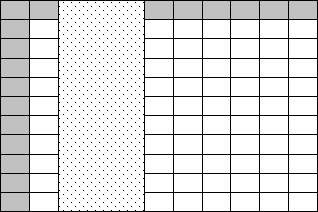
If the last three rows of the grid are removed, the realized coordinates of the same range are now top = 0, bottom =7, left = 2, and right = 4. No changes were made to the original range. It is still defined as Cols(2,4).
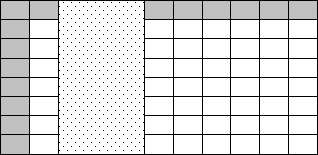
Ranges do not change when rows or columns are inserted into or deleted from the grid. In the example above, if we insert a new column between columns three and four, the range does not expand to reflect the addition. The range is still Cols(2,4).
Calls to Rows(), Cols(), Cells(), and Table() are not cumulative. You cannot combine successive calls to these methods to define more complex range of cells. A call to any of these methods redefines a range. For example, calling Rows(4,7) followed by Cols(2,5) results in a range of Cols(2,5), not the intersection or union of the two ranges.
The Range class contains the following public properties.
| Property | Description |
| Bottom | Gets the bottom row in the range |
| Height | Gets the height, in rows, of the range |
| IsCells | Returns true if this is an arbitrary range of cells |
| IsCols | Returns true if this is a range of columns |
| IsRows | Returns true if this is a range of rows |
| IsTable | Returns true if this range references an entire table |
| IsValid | Returns true if and only if this range is valid |
| Left | Gets the leftmost column in the range |
| RangeType | Gets the type of range as a RangeType enumeration |
| Right | Gets the rightmost column in the range |
| Top | Gets the topmost row in the range |
| Width | Gets the width, in columns, of the range |
The Style class encapsulates all of the information required to format a cell in a grid control. In addition to formatting information, styles also define most of the grid's behavior. The style information for a cell or a range of cells can be obtained from a Cell object. Style objects can also be applied to a cell or range of cells to change the format of that cell or range. The following code snippets show the use of a style object to format a range of cells in a grid control.
C#:
// Create a range and a style Range range = Range.Cells(2, 3, 4, 5); Style style = new Style(); // Assign a background color and value to the style style.Interior = OGBrush.OGSolidBrush(Color.White); style.Value = "Test"; // Apply the style to the grid gridControl1.SetStyleRange(range, style); |
Visual Basic:
' Create a range and a style Dim range As Range range = range.Cells(2, 3, 4, 5) Dim style As Style style = New Style() ' Assign a background color and value to the style style.Interior = OGBrush.OGSolidBrush(Color.White) style.Value = "Test" ' Apply the style to the grid GridControl1.SetStyleRange(range, style) |
The Style class supports combining style objects. For example, you can copy from one style to a second style only the properties that are not initialized in the second style. This feature allows you to combine styles and is analogous to the concept of inheritance in programming languages. You can specify a base style from which other styles can inherit properties at run time.
Properties of the Style class are associated with an include bit. This include bit is true when a property is initialized. If it is false, the property is not initialized. When drawing the grid, Objective Grid for Microsoft .NET fills up all uninitialized properties of the cell style object with values inherited from the base styles.
The Style attribute on a Cell object allows users to get and change the style of a specific cell. For details, see Section 2.2.1, "The Cell Class." The GridControl class contains methods and events for changing the style of a cell or range of cells. For details, see Section 2.2.5, "The GridControl Class."
For a complete description of the public interface to Style, see the Objective Grid for Microsoft® .NET® Reference Guide.
The Style class contains the following public methods:
| Method | Description |
| Clone | Creates a new copy of an existing Style object. |
| Dispose | Disposes of the resources used by a Style object. |
| Free | Frees the resources used by a Style object. |
| SetDefaults | Sets the cell's properties to default values. |
The Style class contains the following public properties:
| Property | Description |
| AllowEnter | Gets or sets the allow enter property. |
| AutoSize | Gets or sets the auto size property. |
| Borders | Gets or sets the appearance of the cell borders. |
| ChoiceList | Gets or sets choice list values. |
| Control | Gets or sets the embedded control type. |
| Draw3dFrame | Gets or sets the 3D effect of the cell. |
| EllipseType | Gets or sets the type of ellipsis used when the text is longer than the cell. |
| Enabled | Gets or sets the enabled state for the cell. |
| FloatCell | Gets or sets the float cell property. |
| FloodCell | Gets or sets the flood cell property. |
| HorzAlign | Gets or sets the cell's horizontal alignment. |
| IncludeAllowEnter | Gets or sets the state of the AllowEnter property. |
| IncludeAutoSize | Gets or sets the state of the AutoSize property. |
| IncludeBorders | Gets or sets the state of the Borders property. |
| IncludeChoiceList | Gets or sets the state of the ChoiceList property. |
| IncludeControl | Gets or sets the state of the Control property. |
| IncludeDraw3dFrame | Gets or sets the state of the Draw3dFrame property. |
| IncludeEnabled | Gets or sets the state of the Enabled property. |
| IncludeFloatCell | Gets or sets the state of the FloatCell property. |
| IncludeFloodCell | Gets or sets the state of the FloodCell property. |
| IncludeHorzAlign | Gets or sets the state of the HorzAlign property. |
| IncludeInterior | Gets or sets the state of the Interior property. |
| IncludeItemData | Gets or sets the state of the ItemData property. |
| IncludeMaxLength | Gets or sets the state of the MaxLength property. |
| IncludeMergeCell | Gets or sets the state of the MergeCell property. |
| IncludeReadOnly | Gets or sets the state of the ReadOnly property. |
| IncludeTextColor | Gets or sets the state of the TextColor property. |
| IncludeTextFont | Gets or sets the state of the TextFont property. |
| IncludeTriState | Gets or sets the state of the TriState property. |
| IncludeUserAttribute | Gets or sets the state of a specific user attribute. |
| IncludeValue | Gets or sets the state of the Value property. |
| IncludeVertAlign | Gets or sets the state of the VertAlign property. |
| IncludeVerticalScroll | Gets or sets the state of the VerticalScroll property. |
| IncludeWrapText | Gets or sets the state of the WrapText property. |
| InitialValue | Gets or sets the initial value of the spin control. |
| Interior | Gets or sets the interior brush. |
| ItemData | Gets or sets a pointer to a user defined item data. |
| LowerBound | Gets or sets the lower bound of the spin control. |
| Mask | Gets or sets a user specified mask string. |
| MaxLength | Gets or sets the maximum length of the stored value. |
| MergeCell | Gets or sets the cell merge behavior. |
| OnlyNumericValues | Gets or sets numeric validation. |
| Prompt | Gets or sets the user specified input prompt. |
| ReadOnly | Gets or sets the cell's read-only state. |
| TextColor | Gets or sets the color of text in a cell. |
| TextFont | Gets or sets the cell's text font. |
| ToolTip | Gets or sets the string used for the tool tip. |
| TriState | Gets or sets the tristate property of the cell. |
| TypeOf | Gets or sets the value type. |
| UpperBound | Gets or sets the upper bound of the spin control. |
| ValidateMessage | Gets or sets the message to be displayed if the Style value is invalid. |
| ValidMaximum | Gets or sets the highest valid minimum value. |
| ValidMinimum | Gets or sets the lowest valid value. |
| Value | Gets or sets the stored value. |
| VertAlign | Gets or sets the cell's vertical alignment. |
| VerticalScroll | Gets or sets the vertical scroll bar in a cell. |
| WrapText | Gets or sets text wrap. |
| WrapValue | Gets or sets the Wrap Value property. |
Making a change to a cell's style is an expensive operation. Because changes to a cell's style are automatically updated when assigned, making many changes sequentially can decrease your application's performance. The following code shows this penalty:
gridControl[1,1].Style.Value = "100"; gridControl[1,1].Style.TypeOf = StyleValueType.typeNumeric; // ...other assignments to the Style object... |
To avoid this penalty, create a new Style object (or copy an existing Style object), apply your changes to it, and then assign it to the cell(s):
// create a new Style object Style myStyle = new Style(); // apply changes myStyle.Value = "100"; myStyle.TypeOf = StyleValueType.typeNumeric; // ...other assignments to myStyle ... // assign new Style to a cell gridControl[1,1].Style = myStyle; |
This technique is particularly important when you are assigning many properties to the same cell.
An instance of the Param class contains or points to all necessary data for persisting the state of the grid object. Parameter objects can be stored in documents and serialized, or can be used as members of other classes. Parameter objects can also be shared between grid objects.
For a complete description of the public interface to Param, see the Objective Grid for Microsoft® .NET® Reference Guide.
| Method | Description |
| EnableTrackingColWidth | Overloaded. Specifies the options for or disables changing column widths for the end user. |
| EnableTrackingRowHeight | Overloaded. Specifies the options for or disables changing row heights for the end user. |
| Finalize | Destructor. |
| ReInitializeData | Reinitializes the embedded OGData and OGParam objects. |
| Property | Description |
| CellActivationMode | Determines the options for activating/editing the current cell. |
| DrawOrder | Gets or sets the drawing order. |
| EnableHorizontalSorting | Gets or sets row sorting when double clicked. |
| EnableVerticalSorting | Gets or sets column sorting when double clicked. |
| ExcelLikeCurrentCell | Gets or sets the default Objective Grid or Excel-like behavior of the current cell. |
| ExcelLikeHeaders | Gets or sets the Excel-like behavior of the headers. |
| ExcelLikeScrolling | Gets or sets scroll behavior to mimic Excel scroll behavior. |
| ExcelLikeSelectionFrame | Gets or sets the option to draw a small frame around the selected range of cells. |
| ExpressionDisplayMode | Gets or sets the display of formula expressions in inactive cells. |
| HideCurrentCellMode | Gets or sets options for hiding the current cell. |
| LockReadOnly | Gets or sets the readonly state for cells in the grid. |
| NumberedColHeaders | Gets or sets numbered column headers. |
| NumberedRowHeaders | Gets or sets numbered row headers. |
| Properties | Gets the OGProperties object associated with the grid. |
| Selections | Gets the allowable cell selections for the grid. |
| SmartResize | Enable and disable smart resizing. |
| SpecialMode | Gets or sets list box behavior. |
| TransparentBackground | Gets or sets a transparent background color for cells. |
The GridControl class encapsulates the Objective Grid for Microsoft .NET custom control. It is derived from the Windows.Forms.Panel class (which is derived from System.Windows.Control). It inherits a rich set of methods, properties, and events from its base class. It also adds a rich public interface, a number of properties, and many events of its own.
Windows Forms custom controls allow you to quickly create user interfaces by re-using existing controls. The Objective Grid for Microsoft .NET custom control is an example of the benefits of this programming paradigm. To use the GridControl, you drag a GridControl from the Toolbox in Visual Studio onto a Windows form, and an instance of GridControl is created and displayed for design-time editing. The public properties and events defined for GridControl appear in the property grid for design-time manipulation.
For a complete description of the public interface to GridControl, see the Objective Grid for Microsoft® .NET® Reference Guide.
The Windows Forms Designer generates the code needed to instantiate, initialize, format (according to the selected design-time property settings), and display the grid. All of the following code is generated by the Windows Forms Designer:
C#:
#region Windows Forms Designer generated code
/// <summary>
/// Required method for Designer support - do not modify
/// the contents of this method with the code editor.
/// </summary>
private void InitializeComponent()
{
  this.gridControl1 = new Stingray.Grid.GridControl();
  ((System.ComponentModel.ISupportInitialize)(this.gridControl1)).
    BeginInit();
  this.SuspendLayout();
  //
  // gridControl1
  //
  this.gridControl1.ColCount = 30;
  this.gridControl1.DefaultColWidth = 70;
  this.gridControl1.DefaultRowHeight = 14;
  this.gridControl1.EnableUndo = true;
  this.gridControl1.FrozenCols = 0;
  this.gridControl1.FrozenRows = 0;
  this.gridControl1.HeaderCols = 0;
  this.gridControl1.HeaderRows = 0;
  this.gridControl1.Location = new System.Drawing.Point(8, 8);
  this.gridControl1.Name = "gridControl1";
  this.gridControl1.RowCount = 30;
  this.gridControl1.Size = new System.Drawing.Size(608, 472);
  this.gridControl1.TabIndex = 0;
  this.gridControl1.Text = "gridControl1";
  //
  // Form1
  //
  this.AutoScaleBaseSize = new System.Drawing.Size(5, 13);
  this.AutoScroll = true;
  this.ClientSize = new System.Drawing.Size(544, 405);
  this.Controls.AddRange(new System.Windows.Forms.Control[] {
    this.gridControl1});
  this.Name = "Form1";
  this.Text = "Sample Grid Application";
  ((System.ComponentModel.ISupportInitialize)(this.gridControl1)).
    EndInit();
  this.ResumeLayout(false);
}
#endregion
|
Visual Basic:
'NOTE: The following procedure is required by the Windows Forms Designer
'It can be modified using the Windows Forms Designer.
'Do not modify it using the code editor.
Friend WithEvents GridControl1 As Stingray.Grid.GridControl
<System.Diagnostics.DebuggerStepThrough()>
Private Sub InitializeComponent()
    Me.GridControl1 = New Stingray.Grid.GridControl()
    CType(Me.GridControl1,
      System.ComponentModel.ISupportInitialize).BeginInit()
    Me.SuspendLayout()
    '
    'GridControl1
    '
    Me.GridControl1.ColCount = 30
    Me.GridControl1.DefaultColWidth = 70
    Me.GridControl1.DefaultRowHeight = 15
    Me.GridControl1.EnableUndo = true
    Me.GridControl1.FrozenCols = 0
    Me.GridControl1.FrozenRows = 0
    Me.GridControl1.HeaderCols = 0
    Me.GridControl1.HeaderRows = 0
    Me.GridControl1.Location = New System.Drawing.Point(8, 8)
    Me.GridControl1.Name = "GridControl1"
    Me.GridControl1.RowCount = 30
    Me.GridControl1.Size = New System.Drawing.Size(584, 464)
    Me.GridControl1.TabIndex = 0
    Me.GridControl1.Text = "GridControl1"
    '
    'Form1
    '
    Me.AutoScaleBaseSize = New System.Drawing.Size(5, 13)
    Me.ClientSize = New System.Drawing.Size(600, 477)
    Me.Controls.AddRange(New System.Windows.Forms.Control()
      {Me.GridControl1})
    Me.Name = "Form1"
    Me.Text = "Form1"
    CType(Me.GridControl1,
      System.ComponentModel.ISupportInitialize).EndInit()
    Me.ResumeLayout(false)
End Sub
|
GridControl defines a number of public events along with associated virtual event handlers. This allows you to handle grid events in one of two ways.
You can derive a new control class from GridControl, override the virtual event handler methods, and include custom event-handling logic for the events. This technique must be used when you want to completely avoid executing the base class (GridControl) event-handling logic for an event. Do not call the base class event handler.
You can attach delegates to the events and handle the events in those delegates. This mechanism is convenient, particularly when using the Windows Forms Designer. You can double-click the name of the event to be handled, and the Windows Forms Designer automatically generates a delegate stub and attaches it to the event. You then write the event-handling logic in the generated delegate stub.
Once the GridControl is placed into a Windows Form and all desired design-time configurations are complete, you can use the public interface to the GridControl to programmatically control the grid and respond to grid events.
This section describes the methods of the GridControl class. Table 12 lists public and protected methods available for GridControl.
| Method | Description |
| BeginInit | Implements ISupportInitialize. |
| CalcClientColFromPt | Determines the column for the point. |
| CalcClientRowFromPt | Determines the row for the point. |
| CalcRectFromRowColEx | Overloaded. Computes the window-area for the given range of cells. |
| CalcSumOfColWidths | Overloaded. Computes the total width of the given columns. If the total width exceeds nAbortAt, the method aborts and returns the value that is greater than nAbortAt. |
| CalcSumOfRowHeights | Overloaded. Computes the total height of the given rows. |
| CanClear | Determines if the currently selected range of cells can be cleared. |
| CanCopy | Determines if the currently selected range of cells can be copied. |
| CanCut | Determines if the currently selected range of cells can be cut. |
| CanPaste | Determines if a range of cells on the clipboard can be pasted into the grid. |
| CanSelectCurrentCell | Determines if the new current cell can be selected or the old current cell deselected. |
| ClearCells | Overloaded. Clears a range of cells. |
| ConvertClientCol | Converts the specified column index into a relative index. |
| ConvertClientRow | Converts the specified row index into a relative index. |
| ConvertCol | Converts the specified column index into an absolute index. |
| ConvertRow | Converts the specified row index into an absolute index. |
| CopyCells | Overloaded. Copies a range of cells to a specified location in the grid. |
| DelayFloatCells | Overloaded. Recalculates floating cells. |
| DelayMergeCells | Overloaded. Recalculates merge cells. |
| DesignTimeInitialize | Performs some specialized design-time grid initialization. |
| EndInit | Implements ISupportInitialize. |
| GetColWidth | Gets the column width, in pixels, of the specified column. If it is 0 then the column is hidden. |
| GetExpressionRowCol | Gets the expression stored in a particular cell. |
| GetFontHeight | Returns the height of the standard-style font in pixels. |
| GetFontWidth | Returns the average width of the standard-style font in pixels. |
| GetGridRect | Returns the window area for the grid. |
| GetRowHeight | Gets the row height, in pixels, of the specified column. If it is 0, the row is hidden. |
| GetSelectedCols | Overloaded. Returns an array containing the selected column IDs. |
| GetSelectedRows | Overloaded. Returns an array containing the selected row IDs. |
| GetValueRowCol | Gets the value stored in a cell. |
| Height_DPtoLP | Divides the pixel-value by the value determined through GetFontHeight. |
| Height_LPtoDP | Multiplies the logical value with the value determined through GetFontHeight. |
| HideCols | Overloaded. Hides the specified columns. |
| HideRange | Hides a range of cells. |
| HideRows | Overloaded. Hides the specified rows. |
| HitTest | Determines the type of information displayed at a window coordinate (pt). |
| Initialize | Initializes a GridControl object state at runtime. |
| InitParamObject | Initializes the grid parameter object. |
| InsertCols | Overloaded. Inserts columns. |
| InsertRows | Overloaded. Inserts rows. |
| IsActiveCurrentCell | Returns true if the current cell is active. |
| IsColHidden | Determines if the specified column is hidden. |
| IsCurrentCell | Overloaded. Determines if a current cell is selected or is the specified cell. |
| IsRowHidden | Determines if the specified row is hidden. |
| LockUpdate | Overloaded. Prevents display of updates until lockUpdate(false) is called. |
| MoveCells | Overloaded. Moves a range of cells. |
| MoveCols | Overloaded. Moves the specified block of columns to another location. |
| MoveCurrentCell | Overloaded. Selects a new current cell based on an offset from the existing current cell. |
| MoveRows | Overloaded. Moves the specified block of rows to another location. |
| OnClear | Overloaded. Raises the Clear event. |
| OnCopy | Raises the Copy event. |
| OnCut | Raises the Cut event. |
| OnFind | Raises the Find event. |
| OnGetStyleRowCol | Raises the GetStyleRowCol event. |
| OnPaste | Raises the Paste event. |
| OnPrint | Raises the Print event. |
| OnPrintPreview | Overloaded. Raises the PrintPreview event. |
| OnRedo | Raises the Redo event. |
| OnReplace | Raises the Replace event. |
| OnUndo | Raises the Undo event. |
| RedrawGrid | Overloaded. Redraws the whole grid. |
| RedrawRowCol | Overloaded. Redraw the specified range of cells. |
| RegisterControl | Registers a .NET control for use as a Objective Grid for Microsoft .NET cell editor. |
| RemoveCols | Overloaded. Removes a block of columns. |
| RemoveRows | Overloaded. Removes a block of rows. |
| ResetCurrentCell | Overloaded. Deactivates the current cell. |
| ScrollCellInView | Overloaded. Scrolls the cell into the view if it is outside the visible area. |
| SelectRange | Overloaded. Selects or deselects a range of cells. |
| SetColCount | nColsthe number of columns for the grid rFlagsthe RedrawFlags for the operation |
| SetColWidth | Overloaded. Sets the column-widths for specific columns in pixels. |
| SetCoveredCellsRowCol | Overloaded. Sets the covered cells-range for a cell. |
| SetExpressionRowCol | Overloaded. Stores the expression in the specified cell. |
| SetFloatCellsMode | Turns on and off the calculation of floating cells in the grid. |
| SetGridLineStyle | Set the grid line style. |
| SetGridRect | Overloaded. Sets the grid rectangle for the window. |
| SetMergeCellsMode | Turns on and off the calculation of merge cells in the grid. |
| SetRowCount | Sets the number of rows in the grid. |
| SetRowHeight | Overloaded. Sets the row-heights for specific rows in pixels. |
| SetStyleRange | Overloaded. Applies cell formatting to the specified range of cells. |
| SetValueRange | Overloaded. Sets a range of cells with the specified value. |
| TransferCurrentCell | Overloaded. Stores and deactivates the current cell or actualizes the current cell's contents. |
| UseControl | Uses the named CellControl in the grid at the named row and column location. |
| Width_DPtoLP | The method divides the pixel-value by the value determined through GetFontWidth. |
| Width_LPtoDP | The method multiplies the logical value with the value determined through GetFontWidth. |
| Finalize | Destructor. |
| UpdateFrozenCols | Overloaded. Updates the window after freezing columns. |
| UpdateFrozenRows | Overloaded. Updates the window after freezing rows. |
Table 13 lists the virtual event handlers that are available with GridControl. Each of these methods raises its corresponding event (to invoke any attached delegates) when it is invoked. When overriding these methods, the base (GridControl) implementation of the method must be invoked from the derived class implementation, in order to invoke any attached delegates.
| Event Handler | Description |
| OnCanceledEditing | Raises the CanceledEditing event. |
| OnCancelEditing | Raises the CancelEditing event. |
| OnClickedButtonRowCol | Raises the ClickedButtonRowCol event. |
| OnCreateControl | Overridden from Panel. |
| OnDeleteCell | Raises the DeleteCell event. |
| OnDrawGridItem | Raises the DrawGridItem event. |
| OnDrawTopLeftBottomRight | Raises the DrawTopLeftBottomRight event. |
| OnEndEditing | Raises the EndEditing event. |
| OnGridDraw | Raises the GridDraw event. |
| OnInitCurrentCell | Raises the InitCurrentCell event. |
| OnLButtonClickedRowCol | Raises the LButtonClickedRowCol event. |
| OnLButtonDblClkRowCol | Raises the LButtonDblClkRowCol event. |
| OnLButtonHitRowCol | Raises the LButtonHitRowCol event. |
| OnLeftCell | Raises the LeftCell event. |
| OnMButtonClickedRowCol | Raises the MButtonClickedRowCol event. |
| OnMButtonDblClkRowCol | Raises the MButtonDblClkRowCol event. |
| OnMButtonHitRowCol | Raises the MButtonHitRowCol event. |
| OnModifyCell | Raises the ModifyCell event. |
| OnMovedCurrentCell | Raises the MovedCurrentCell event. |
| OnProcessKeys | Raises the ProcessKeys event. |
| OnRButtonClickedRowCol | Raises the RButtonClickedRowCol event. |
| OnRButtonDblClkRowCol | Raises the RButtonDblClkRowCol event. |
| OnRButtonHitRowCol | Raises the RButtonHitRowCol event. |
| OnStartEditing | Raises the StartEditing event. |
| OnStoreColWidth | Raises the StoreColWidth event. |
| OnStoreCopyCells | Raises the StoreCopyCells event. |
| OnStoreDefaultColWidth | Raises the StoreDefaultColWidth event. |
| OnStoreDefaultRowHeight | Raises the StoreDefaultRowHeight event. |
| OnStoreFrozenCols | Raises the StoreFrozenCols event. |
| OnStoreFrozenRows | Raises the StoreFrozenRows event. |
| OnStoreHideCol | Raises the StoreHideCol event. |
| OnStoreHideRow | Raises the StoreHideRow event. |
| OnStoreInsertCols | Raises the StoreInsertCols event. |
| OnStoreInsertRows | Raises the StoreInsertRows event. |
| OnStoreMoveCols | Raises the StoreMoveCols event. |
| OnStoreMoveRows | Raises the StoreMoveRows event. |
| OnStoreReadOnly | Raises the StoreReadOnly event. |
| OnStoreRemoveCols | Raises the StoreRemoveCols event. |
| OnStoreRemoveRows | Raises the StoreRemoveRows event. |
| OnStoreRowHeight | Raises the StoreRowHeight event. |
| OnStoreStyleRowCol | Raises the StoreStyleRowCol event. |
| OnStoreZoom | Raises the StoreZoom event. |
| OnValidateCell | Raises the ValidateCell event. |
| OnValidating | Overridden from Panel. |
Table 14 shows the public properties in the GridControl class.
| Property | Description |
| AcclerateArrowKey | Sets scrolling speed with arrow keys. |
| AcclerateScrollBars | Sets scrolling speed with scrollbar buttons. |
| AutoScroll | Sets auto-scroll mode. |
| Cell | Grid cell indexer, which allows a grid Cell object to be obtained. |
| CurrentCell | Gets or sets the current grid cell. |
| DefaultColWidth | Returns the default value for the column-width in pixels. |
| DefaultRowHeight | Returns the default value for the row-height in pixels. |
| EnableUndo | Returns true if undo-creation is enabled; false otherwise. |
| Features | Returns a reference to the GridFeatures object associated with a particular GridControl object. |
| FloatCells | Returns the setting of floating cells: enabled or disabled. |
| FrozenCols | Returns the number of frozen columns in the grid. |
| FrozenRows | Returns the number of frozen rows. |
| HeaderCols | Returns the number of columns to be used as row headers. |
| HeaderRows | Returns the number of rows to be used as column headers. |
| LeftCol | Returns the leftmost non-frozen column of the view. |
| MergeCells | Returns the setting of merging cells: enabled or disabled. |
| Param | Returns a pointer to the parameter object. |
| Properties | Returns a pointer to the properties object. |
| ReadOnly | Returns the read only setting. |
| RightToLeft | Overrides Control.RightToLeft. |
| TopRow | Returns the index of the topmost scrollable row. |
| Zoom | Returns the zooming-factor as a percentage. |
This section lists the events available to be handled in the GridControl class.
Each event has an associated virtual event handler, whose name is prefixed with "On". The grid-specific event handlers (those not inherited from the Windows.Forms.Control class) accept an event arguments object whose type name is formed by the name of the event plus the text "EventArgs". For example, the CancelEditing event has an associated event handler named "OnCancelEditing", and the argument passed to "OnCancelEditing" is of type "CancelEditingEventArgs".
A delegate attached to grid-specific events accepts two arguments: an object and an event arguments object of the same type as supplied to the virtual event handler for the event. For example, the signature of a delegate for the CancelEditing event would appear as follows:
C#:
private void gridControl1_CancelEditing(
             object sender,
             Stingray.Grid.CancelEditingEventArgs e)
{ }
|
Visual Basic:
Private Sub GridControl1_CancelEditing(
            ByVal sender As Object,
            ByVal e As Stingray.Grid.CancelEditingEventArgs)
            Handles GridControl1.CancelEditing

End Sub
|
For more information regarding the events and virtual event handlers associated with the GridControl class, see the Objective Grid for Microsoft® .NET® Reference Guide.
Table 15 lists the Objective Grid for Microsoft .NET-specific public events. The events are grouped by function.
| Event | Description |
| CanceledEditing | Canceled Editing Event. |
| CancelEditing | Cancel Editing Event. |
| Clear | Clear Event. |
| Click | Occurs when the control is clicked. |
| ClickedButtonRowCol | Clicked Button Row/Column Event. |
| Copy | Copy Event. |
| Cut | Cut Event. |
| DeleteCell | Delete Cell Event. |
| DrawGridItem | Draw Grid Item Event. |
| DrawTopLeftBottomRight | Draw Top, Left, Bottom, Right Event. |
| EndEditing | End Editing Event. |
| Find | Find Event. |
| GetStyleRowCol | Get Style Row Col Event. |
| GridBeginPrint | Invoked when printing begins. |
| GridBeginPrintPreview | Invoked when print preview begins. |
| GridDraw | Grid Draw Event. |
| GridEndPrint | Invoked when printing is ending. |
| GridEndPrintPreview | Invoked when print preview is ending. |
| GridInitialized | Grid Initialized Event. |
| GridPrintPage | Invoked as each page is printed. |
| GridPrintPreviewPage | Invoked as each page of a print preview is prepared for preview. |
| HorizontalScroll | Horizontal Scroll Event. |
| InitCurrentCell | Init Current Cell Event. |
| KeyDown | Occurs when a key is pressed while the control has focus. |
| KeyPress | Occurs when a key is pressed while the control has focus. |
| KeyUp | Occurs when a key is released while the control has focus. |
| LButtonClickedRowCol | Left Button Clicked Row Column Event. |
| LButtonDblClkRowCol | Left Button Double Clicked Row Column Event. |
| LButtonHitRowCol | Left Button Hit Row Column Event. |
| LeftCell | Left Cell Event. |
| MButtonClickedRowCol | Middle Button Clicked Row Column Event. |
| MButtonDblClkRowCol | Middle Button Double Clicked Row Column Event. |
| MButtonHitRowCol | Middle Button Hit Row Column Event. |
| ModifyCell | Modify Cell Event. |
| MouseDown | Occurs when the mouse pointer is over the control and a mouse button is pressed. |
| MouseMove | Occurs when the mouse pointer is moved over the control. |
| MouseUp | Occurs when the mouse pointer is over the control and a mouse button is released. |
| MovedCurrentCell | Moved Current Cell Event. |
| Paint | Occurs when the control is redrawn. |
| Paste | Paste Event. |
| Print event invoked from OnPrint. | |
| PrintPreview | PrintPreview event invoked from OnPrintPreview. |
| ProcessKeys | Process Keys Event. |
| RButtonClickedRowCol | Right Button Clicked Row Column Event. |
| RButtonDblClkRowCol | Right Button Double Clicked Row Column Event. |
| RButtonHitRowCol | Right Button Hit Row Column Event. |
| Redo | Redo Event. |
| Replace | Replace Event. |
| StartEditing | Start Editing Event. |
| StoreColWidth | Store Column Width Event. |
| StoreCopyCells | Store Copy Cells Event. |
| StoreDefaultColWidth | Store Default Column Width Event. |
| StoreDefaultRowHeight | Store Default Row Height Event. |
| StoreFrozenCols | Store Frozen Cells Event. |
| StoreFrozenRows | Store Frozen Rows Event. |
| StoreHideCol | Store Hide Column Event. |
| StoreHideRow | Store Hide Row Event. |
| StoreInsertCols | Store Insert Columns Event. |
| StoreInsertRows | Store Insert Rows Event. |
| StoreMoveCols | Store Move Columns Event. |
| StoreMoveRows | Store Move Rows Event. |
| StoreReadOnly | Store ReadOnly Event. |
| StoreRemoveCols | Store Remove Columns Event. |
| StoreRemoveRows | Store Remove Rows Event. |
| StoreRowHeight | Store Row Height Event. |
| StoreStyleRowCol | Store Style Row Column Event. |
| StoreZoom | Store Zoom Event. |
| Undo | Undo Event. |
| ValidateCell | Validate Cell Event. |
| VerticalScroll | Vertical Scroll Event. |


Copyright © Rogue Wave Software, Inc. All Rights Reserved.
The Rogue Wave name and logo, and Stingray, are registered trademarks of Rogue Wave Software. All other trademarks are the property of their respective owners.
Provide feedback to Rogue Wave about its documentation.