Executing a Buildspec from the Command Line
As an alternative to running buildspecs from the RCB GUI, you can run buildspecs from the command line. Buildspecs executed from the command line are built more quickly than those executed in the GUI.
There are two ways to launch a build from the command line. Both methods require the buildspec to be created in the GUI:
Create a buildspec, exit the GUI at the Build Queue screen, and run the build manager from the command line, as explained in Running the Build Manager from the Command Line (Method 1).
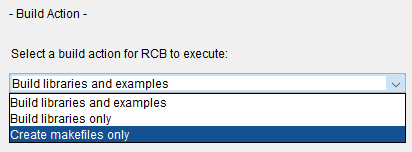
Specify Create makefiles only on the Build Action screen, submit the buildspec on the Build Queue screen, and then run make on the results, as explained in Running make from the Command Line (Method 2).
The following sections describe the command line buildspec creation process in more detail.
On this page:
Running the Build Manager from the Command Line (Method 1)
To run the build manager from the command line:
1. Create a buildspec in the GUI, as explained in Creating Buildspecs.
2. At the Build Queue screen, shown in Consider Build Queue Options, exit the GUI.
3. Invoke the build manager on the command line:
rcb build -bbuildspace\records\specs\buildspecname.bsf
export_buildspace\records\specs\buildspecname.bsf.The buildspec is processed exactly the same way as when invoked from the GUI, except that the output is sent to the command window rather than to a window in the GUI.
There are two advantages to this approach: it is a little faster, and it is less resource intensive. The disadvantage is that you can start running only one buildspec at a time, whereas the GUI lets you process several buildspecs with a single invocation.
Note that if you specified just create makefiles in the buildspec, the build manager stops at that point just as it would when invoked from RCB. You would then proceed as described in Running make from the Command Line (Method 2).
The results of running a buildspec are explained in Results of Running a Buildspec.
Running make from the Command Line (Method 2)
To invoke the build manager from the command line:
1. In RCB, create a buildspec (as explained in Creating Buildspecs) that specifies Create makefiles only as the build action.
2. At the Build queue screen shown in Consider Build Queue Options, submit the buildspec to the RCB build manager by doing one of the following:
Click Build entries in Queue, or
Click Exit and then invoke RCB from the command line as shown in Step 3 of Running the Build Manager from the Command Line (Method 1).
3. Go to the directory containing the makefile and execute make.
The makefile is located in:
buildspace\source\module-name\build-configuration
For example, for the Essential Tools Module being built in the 12s build configuration, the makefile would be in:
buildspace\source\tools\12s
The results of running a buildspec are explained in Results of Running a Buildspec.
If you want to invoke all the makefiles for a configuration at once, RCB creates a makeall script file to do so. For more information, see Invoking RCB's Makefiles from the Command Line.