The XML Streams Package Character Encoding Requirements
The classes in the XML Streams package all read and write UTF-8 encoded documents. This means that the XML input streams take in UTF-8 only, and the XML output streams produce UTF-8 only.
You can, however, take advantage of various conversion utilities in SourcePro Core to convert your XML streams to and from any recognized character encoding. The Essential Tools Module and Internationalization Module contain classes that help you convert to and from UTF-8 prior to sending your data or character into the input stream, and after your data or character is returned by the output stream.
In addition, you may use a UTF-16 Unicode or wide character inserter or extractor interface to your XML streams, and the XML streams classes will internally convert between UTF-16 and UTF-8 as necessary. For a discussion on narrow character, wide, and Unicode interfaces, see Narrow Character Interfaces and Wide and Unicode Character Interfaces.
Narrow Character Interfaces
All narrow character interfaces, such as RWCString, char, and char* inserters and extractors, take or produce only UTF-8 encoded characters. If you are using an XML output stream with a narrow character interface, and you try to insert into the stream a non-UTF-8 character, the stream may produce an incorrect document. If your character encoding is UTF-16, you may use RWBasicUString from the Essential Tools Module to convert it to UTF-8. If your encoding is other than UTF-8 or UTF-16, you will need to use RWUString and the conversion utility classes from the Internationalization Module. See Using the XML Streams Package with the Internationalization Module.
Wide and Unicode Character Interfaces
All wide and Unicode character interfaces, such as RWWString, RWBasicUString, RWUString, wchar_t, and wchar_t* inserters and extractors, take or produce only UTF-16 encoded characters. If you are using an XML output stream with a wide or Unicode character interface, and you try to insert into the stream a non-UTF-16 character, the stream may produce an incorrect document.
Output Streams
XML output streams convert UTF-16 encoded characters to UTF-8 before passing them on to the underlying data stream, as illustrated in Figure 96.
You may optionally convert your strings to another encoding after extracting them from the XML.
Figure 96. Wide or Unicode Interfaces to Output Streams

Input Streams
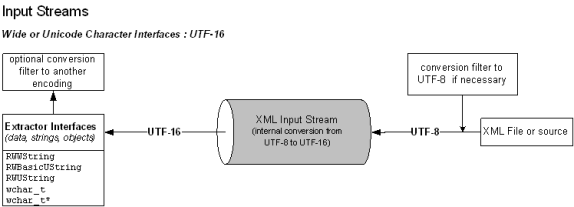
XML input streams convert from UTF-8 to UTF-16 before returning wide or Unicode characters or strings, as illustrated in Figure 97.
You may optionally convert your strings to another encoding after extracting them from the XML.
Figure 97. Wide or Unicode Interfaces to Input Streams