TRANSPOSE Function
Transposes the input array.
 enabled.
note | This operation performs best when the system variable !CACHE accurately reflects cache sizes on the host machine. |
Usage
result = TRANSPOSE(array)
Input Parameters
array—The array to be transposed. The input array can have any number of dimensions.
Returned Value
result—The transposed array.
Keywords
Dimension—A vector of two integers (n ≥ 0) designating the dimensions to transpose. Default: [0,1]
Discussion
TRANSPOSE is used to interchange two dimensions of an array, most commonly the rows and columns of a matrix. For vectors and co-vectors, TRANSPOSE can be used to change from one to the other, but it is more efficient to use REFORM for this purpose.
Example 1
a = INDGEN(2,3)
PM, a
; PV-WAVE prints the following:
; 0 2 4
; 1 3 5
PM, TRANSPOSE(a)
; PV-WAVE prints the following:
; 0 1
; 2 3
; 4 5
Example 2
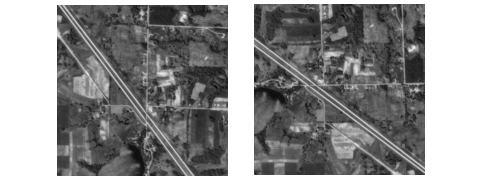
OPENR, lun, !Dir + '/demo/gallery3/data/aerial_demo.img', /Get_lun
aerial_img = BYTARR(512,512)
READU, lun, aerial_img
FREE_LUN, lun
WINDOW, Xsize=512, Ysize=512, /Free, Title='Original Image'
TVSCL, aerial_img
WINDOW, Xsize=512, Ysize=512, /Free, Title='Transposed Image'
TVSCL, TRANSPOSE(aerial_img)
Figure 17-1: Transposed Image shows what an aerial image looks like before and after applying TRANSPOSE.
 |
Example 3
a = INDGEN(2, 4, 3)
PM, a
; PV-WAVE prints the following:
; 0 2 4 6
; 1 3 5 7
; 8 10 12 14
; 9 11 13 15
; 16 18 20 22
; 17 19 21 23
PM, TRANSPOSE(a, Dimension=[0,2])
; PV-WAVE prints the following:
; 0 2 4 6
; 8 10 12 14
; 16 18 20 22
; 1 3 5 7
; 9 11 13 15
; 17 19 21 23
See Also


