cleanup Perforce: Cleanup
Used to cleanup the client workspace after the build. Optionally, setting the global option will delete the workspace files.
To delete the workspace files after the build, use the global setting in Perforce: OnDelete Workspace Options, see Perforce: OnDelete Workspace Options.
Example cleanup Perforce: Cleanup configuration
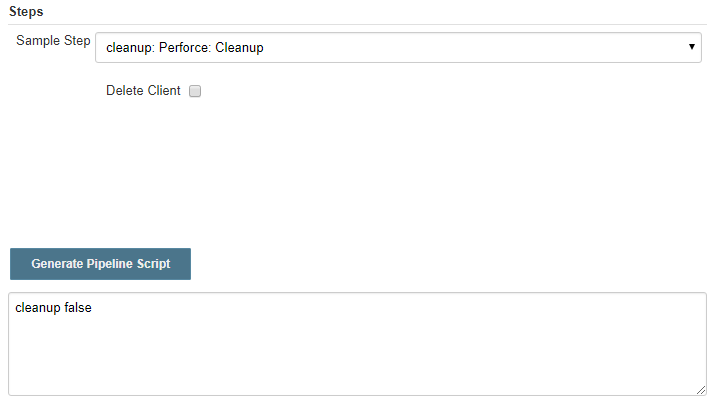
Example generated script for cleanup: Perforce: Cleanup
The following are valid forms of the cleanup script snippet:
// Previous default behavior (deleteClient defaults to true)
cleanup(true)

// Explicit deleteClient
cleanup(deleteClient: true)

// Delete client and force delete client
cleanup(deleteClient: true, forceDeleteClient: true)

// Force delete client with deleteClient explicitly set to false
cleanup(forceDeleteClient: true, deleteClient: false)
The following are invalid scenarios and will not work:
// Invalid: positional arguments with two booleans
cleanup(true, false)

// Invalid: forceDeleteClient cannot be used without an explicit deleteClient named parameter
cleanup(forceDeleteClient: true)
Paste the script snippet into a basic script
Example: the script snippet above has been pasted into a basic script:
pipeline {
	 agent any
        stages {
		 stage('Cleanup') {
			 steps() {
			         // cleanup workspace using explicit named parameters
			         cleanup(deleteClient: true, forceDeleteClient: true)
			 }
		 }
	 }
}
Configure a cleanup Perforce: Cleanup script
- To create a Cleanup script, select cleanup Perforce: Cleanup from the Sample Step dropdown
- Delete Client checkbox:
- Selected:Perforce cleans up the client workspace including the have list. Optionally, setting the global option will delete the workspace files, see Perforce: OnDelete Workspace Options.
- Unselected: the client workspace is not deleted. Optionally, setting the global option will delete the workspace files, see Perforce: OnDelete Workspace Options.
- Force Delete Client (forceDeleteClient: true): (Optional) Forces deletion of the Perforce
client. Must always be used alongside an explicit deleteClient named parameter.
Valid combinations:
- cleanup(deleteClient: true, forceDeleteClient: true): deletes client and force deletes
- cleanup(forceDeleteClient: true, deleteClient: false) force deletes without client cleanup
Generate Pipeline Script
To generate the pipeline script, click Generate Pipeline Script. The script is generated in the text box below the button.
Copy the generated script and paste it into the Script box on the Jenkins Pipeline Script page.
Perforce: OnDelete Workspace Options
Specify how cleanup is handled for a Jenkins job that includes a cleanup Perforce: Cleanup script.
From the Jenkins home page browse to Manage Jenkins > System Configuration > System then scroll down to the section called Perforce: OnDelete Workspace Options

You can select a number of options:
- Delete Perforce client: only applicable when deleting a Jenkins job.
- Delete Workspace files: if your Jenkins job contains a cleanup step or you are deleting a Jenkins job: Perforce deletes the workspace files including the have list.