Workflows
A workflow defines the rules that govern how changelists and code reviews are handled within a project or project branch.
On this page:
Overview
Workflow ensures consistent review practices and enforces quality requirements defined by your organization.
Workflow is enabled by default but can be disabled by an administrator.
- P4 Code Review workflows can be created by any P4 Code Review user.
- Shared P4 Code Review workflows can be viewed by any P4 Code Review user.
- Shared P4 Code Review workflows can be applied to a project or project branch by any P4 Code Review user that is authorized to edit the project.
- The global workflow can be viewed by any P4 Code Review user but can only be edited by a P4 Code Review user with super or admin privileges, or users that have been made an owner.
Workflow scope and inheritance
A workflow may be applied at:
-
The project level
-
The project‑branch level
Branch workflows override project workflows.
If the Global Workflow sets a rule to Enforce, the global rule is merged with the project’s workflow and the most restrictive setting is used.
For more information about how workflow rules are merged, see Merging multiple workflows.
Search workflow names and workflow descriptions
You can search for P4 Code Review workflow names and for the content of the workflow description from the workflows page:
- Enter text in the search box.
- Click Search.
Any workflow names, and descriptions that match the search text are displayed in the workflows tab:

Viewing a workflow
To view workflow details:
-
Click Workflows in the menu.
-
Click on the name of the workflow you want to view.
You can edit a workflow if you are the owner of the workflow, or if you have super user rights. For information about editing the workflow, see Edit a workflow.
-
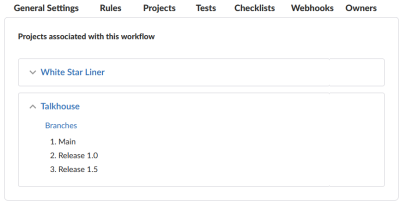
In the projects section of the workflow page:
- The project count does not include project branches.
- If the workflow is associated with a Private project, the private project name is only displayed if you are authorized to view it. Private projects are included in the project count.
Viewing a shared workflow that you do not own
Shared workflows can be viewed and used by all P4 Code Review users. You will only be able to view the workflow details, you will not be able to edit the workflow.
Viewing the global workflow
The global workflow can be viewed by any P4 Code Review user but can only be edited by a P4 Code Review user with super or admin privileges, or users that have been made an owner. For information about editing the global workflow, see Workflow global rules.