Flex license setup
VersIC licensing
VersIC uses FlexNet Publisher software licensing to license its products. A typical license file from Perforce would be the following:
SERVER your_server xxxxxxx1 5289 # specify the correct port
DAEMON mdxlmd $VSC_INSTALL_DIR/tools/mdxlmd PORT=5290 # hardcoding the flex traffic to 5290 for now
USE_SERVER FEATURE VersIC mdxlmd 1.0 15-mar-2010 4 LINGER=432000 DUP_GROUP=U \
SIGN="00DE 9503 234 EC39 234 39A71 234 44 A12A 244 2344 65ED 5C56 8468 664A"
(Note the location of the Perforce flex license server binary mdxlmd.)
The license file should be on a file system accessible by the Flex license daemon. A common place to save this is $VSC_CONFIG_DIR/license/versic.lic
To have VersIC notify users when the license is due to expire set the following in your .cshrc/.bashrc or project source file:
csh:
setenv MDX_LICENSE_FILE $env(VSC_CONFIG_DIR)/license/versic.lic
bash:
export MDX_LICENSE_FILE=$VSC_CONFIG_DIR/license/versic.lic
To start the Flex license server run:
$VSC_INSTALL_DIR/tools/lmgrd -c $MDX_LICENSE_FILE > /var/log/versic.log
A template init.d startup script is shipped with the product, available in the VersIC script directory location - $VSC_INSTALL_DIR/scripts/methodics/licensing/mdx_licenses_init.d
Perforce vendor daemon - mdxlmd
Note that the Perforce vendor daemon "mdxlmd" can be downloaded independently from this link
The Perforce vendor daemon supports Redhat Enterprise 4/5/6/7
Troubleshooting
If VersIC fails to acquire a license, verify that the license server is running and that licenses are available by running lmstat:
$VSC_INSTALL_DIR/tools/lmstat -a -c $MDX_LICENSE_FILE
If lmstat takes more than a few seconds to respond, it's possible that there is a performance problem with your machine, the network and/or the license server. You may be able to workaround this by increasing the VersIC license timeout via the SKILL variable MDX_LIC_TIMEOUT (In the VersIC Configuration file (versic.conf) - the default is 10s):
MDX_LIC_TIMEOUT = 30
The results of lmstat should look like one of the following:
- the server is running normally and there are licenses available, e.g.:
lmstat - Copyright (c) 1989-2008 Acresso Software Inc. All Rights Reserved. Flexible License Manager status on Fri 2/26/2010 10:45 License server status: 5289@nexus License file(s) on nexus: /cad/methodics/license/license.dat: nexus: license server UP (MASTER) v11.6 Vendor daemon status (on nexus): mdxlmd: UP v11.6 Feature usage info: Users of VersIC: (Total of 25 licenses issued; Total of 10 licenses in use)- Verify that MDX_LICENSE_FILE is set correctly in the Cadence session
- Try setting MDX_LIC_TIMEOUT as described above
- Contact Perforce if you are still unable to get a license
- the server is running normally, but all the licenses are in use, e.g.:
Users of VersIC: (Total of 25 licenses issued; Total of 25 licenses in use)- Contact other users to try to free up a license
- Contact Perforce about acquiring additional licenses.
- the server is not running:
lmstat - Copyright (c) 1989-2008 Acresso Software Inc. All Rights Reserved. Flexible License Manager status on Fri 2/26/2010 10:45 License server status: 5289@nexus License file(s) on nexus: /cad/methodics/license/license.dat: lmgrd is not running: Cannot connect to license server system. (-15,570:115 "Operation now in progress")- Restart the license server
- Contact your local support team
- The FlexLM server (lmgrd/mdxlmd) should run on any Linux LSB compliant system, but it is known not to work on Ubuntu releases after 12.04.
- the server is running, but there is a problem, e.g.
lmstat - Copyright (c) 1989-2008 Acresso Software Inc. All Rights Reserved. Flexible License Manager status on Fri 2/26/2010 10:45 License server status: 5289@nexus License file(s) on nexus: /cad/methodics/license/license.dat: nexus: license server UP (MASTER) v11.6 Vendor daemon status (on nexus): mdxlmd: UP v11.6 Feature usage info: Users of VersIC: Cannot get users of VersIC: Timeout. (-139,10013)- Contact your local support team
If VersIC is unable to acquire a license on startup, it will be disabled for the remainder of that session and you will need to restart Cadence once the licenses become available. If a running VersIC session loses its license, it should recover automatically, but most VersIC operations will fail until it is able to reacquire a license.
LINGER licensing
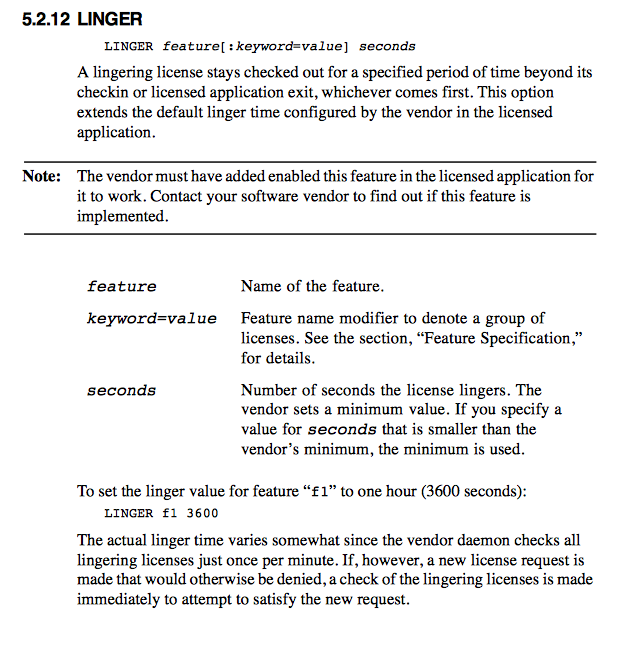
VersIC approximates a per-user licensing scheme using LINGER licensing - this means that once a VersIC license is checked out, it is not available to another user for some time after it has been checked back in.
From the FlexLM user guide ..
Why does VersIC use Linger licenses and not floating licenses?
VersIC/BuildIC are always on applications - they track the state of a users working copy and if somebody else changes something in the repository VersIC will flag the user that they have "stale" data. This essentially means that all active users need a license at all times - you never know when someone else going to do something that will affect you.
In the floating model a user could lose his license if he goes to lunch, doesn't use it for some period and he could end working on old data. This would be a waste of his time since the user won't be able to check in their changes (you can only checkin data if you have a checked out version of the latest data)
Note that the user is licensed for an unlimited number of hosts and displays in the linger model. In the floating license they will be licensed per Cadence session - so if you have 2 Cadence sessions up, in the VersIC/BuildIC case you'll only take 1 license but in the floating case you'll take 2 licenses. The Net result is that most customers prefer linger licenses and Perforce has set its pricing to accommodate this.
Virtual machines and FlexNet licensing
Flex licensing depends on the server machine having a unique hostid, derived from the MAC address. The MAC address of a VM is not guaranteed to be unique, so Perforce does not support the use of a VM as the license server host.