Checkin form
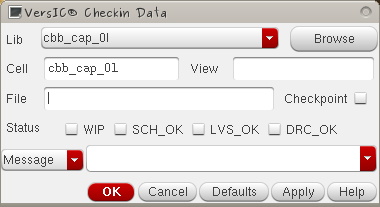
In addition to the standard Lib/Cell/View/File/Browse fields, the Checkin form has some other important components:
Checkpoint button
With the Checkpoint button selected cells are checked in but remain locked after checkin for further editing. This allows the user to publish changes to the repository but ensure that no one else may make edits. This can be useful when other users need to see the latest version of an unfinished cell.
Status buttons
The Status radio buttons prepend the check-in message with an identifier indicating whether the checked-in view is one of the following. DRC Clean, LVS Clean, Simulated Schematic (SCH_OK) or a Work in progress (WIP). These tags are customizable in the VersIC Configuration file (versic.conf), and can be used to track the progress of a particular block during the design cycle (see the discussion on "Data mining the design repository")
Commit message modes
The VersIC Checkin form has two modes for adding a commit message, controlled by the Cyclic field to the left of the text field.

Message requires the user to enter a message in the text field.

From file allows the user to type in the location of a commit file which can be opened for edit with the adjacent Edit File button
Note that pressing the Edit button with an empty text field will bring up a temp file.