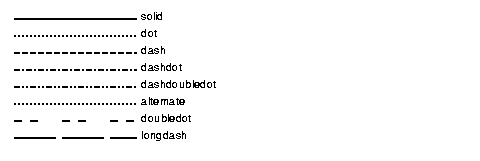
IlvLineStyle: The Line Style Class
You can create your own line styles by requesting IlvLineStyle resource objects from your IlvLineStyle resource objects from your IlvDisplay object and specifying the way dashes are to be drawn.
A line style is represented by an array of unsigned characters returned by the getDashes() member function. The length of the array is returned by the getCount(). This array must not be modified or deleted by the user.
When rendering, Views alternates between drawing foreground-colored segments (dashes) and skipping background segments (gaps), based on the values in the dash array. The drawing begins with the first element (dash length), followed by the second (gap length), and continues alternating until the end of the array, which then repeats cyclically. The getOffset() function returns the number of units to skip at the beginning of the pattern.
There are two ways to define a custom line style:
Line Style in Line-Width Units
IlvLineStyle* getLineStyle(IlUShort count,
const unsigned char* dashes,
IlUShort offset = 0);
Creates a line style where dash and gap lengths are scaled by the line width. For example, if dashes = {3, 2} and the line width is 2, the dash length will be 6 pixels and the gap length 4 pixels. This behavior matches platform conventions like GDIPlus, where dash lengths depend on the pen width.
Line Style in Absolute Pixel Units
IlvLineStyle* getPixelLineStyle(IlUShort count,
const unsigned char* dashes,
IlUShort offset = 0);
Creates a line style with exact pixel values, regardless of the line width. This allows precise control over how the pattern appears on screen. For example, if dashes = {3, 2}, the renderer draws 3 pixels, skip 2 pixels, and repeat, independent of any scaling.
You can also retrieve a predefined or named line style using:
IlvLineStyle* getLineStyle(const char* name) const;
New Line Styles
You can create your own line styles by requesting IlvLineStyle resource objects from your IlvDisplay object and specifying the way dashes are to be drawn.
Line styles can be named. To obtain a new line style, use the following member functions of the class IlvDisplay:
IlvLineStyle* getLineStyle(IlUShort count,
const unsigned char* dashes,
IlUShort offset = 0);
IlvLineStyle* getLineStyle(const char* name) const;
The class IlvDisplay provides a set of predefined line styles that you can obtain using their name: