Main Window
The Main window contains the following areas:
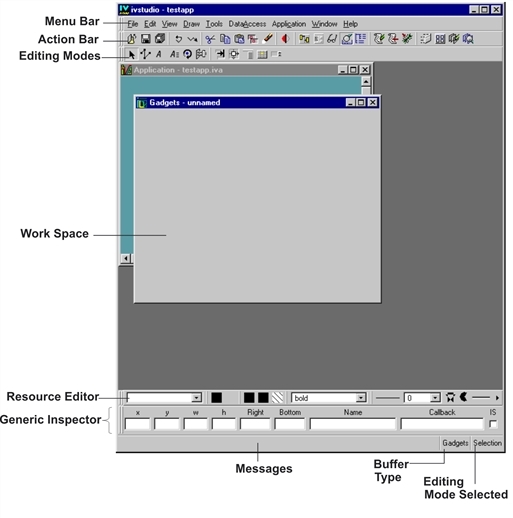
Data Access Main Window
Menu Bar—
Action Bar—
Here are the editing mode buttons you will need in the following tutorial, although there are many others:

 Active
 Focus
Focus
 Attachments
 Menu
Menu
Work Space—
x, y: upper left corner of the object.
w, h: width and height of the object.
Right, Bottom: bottom right corner of the object.
Name: name of the object.
Callback: callback name for the object.
IS: indicates whether the callback is a Script callback or not.
A callback is the relation between a gadget and a function. That is, when a particular gadget is activated, an associated function is called. When you click a button or a menu item, for example, the system recognizes the click and calls the previously defined function associated with that button or menu item.
Messages—This area displays two types of information:
The C++ class of the object you select in the work space.
Procedural information, such as error messages.
Buffer Type—
Gadgets
2D Graphics
Grapher
Application
Editing Modes Selected—This area shows which editing mode is active.
The buffer currently being edited can be changed using the Window menu.