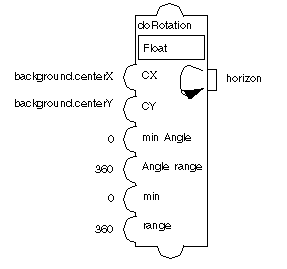
Rotation
The Rotation accessor (class ) lets you set the rotation angle of an object to a given value. The value defined by this accessor is the angle (in degrees) to which the rotation must be set. The angle is stored every time it is set so resetting the value rotates the object by the angle corresponding to the delta between the old and new angles.
The Minimum Angle, Angle Range, Minimum Value, and Value Range parameters are used to compute the new rotation angle given to the input value. The new rotation is computed from the value assigned to the Rotation accessor using the following formula:
angle = minAngle + (value - minimum)* Anglerange / range
The initial value of the rotation angle is assumed to be the value of the Minimum Angle parameter so the initial position of the rotating object must correspond to this value.
Not all graphic objects are sensitive to rotation. Rectangles, ellipses, and text objects do not rotate. It is recommended to use polygons and splines instead.
Parameters
-
Graphic Node: Name of the node to rotate. It must be a graphic node.
-
Center X: X-coordinate of the rotation center. You can use the centerX accessor for this parameter (Float or Integer).
-
Center Y: Y-coordinate of the rotation center. You can use the centerY accessor for this parameter (Float or Integer).
-
Minimum Angle: Minimum angle used to compute the rotation (Float or Integer).
-
Angle Range: Angle range used to compute the rotation (Float or Integer).
-
Minimum: Minimum value used to compute the rotation (Float or Integer).
-
Range: Value range used to compute the rotation (Float or Integer).
-
Handle Interaction: Boolean specifying whether the accessor should behave like an Event accessor when the user clicks on the node to rotate it. If it is set to true, the user can rotate the node and the accessor value is updated accordingly.
-
The type of this value is Float (the angle of rotation).
Example
The following example shows a Rotation accessor attached to the transformer prototype in the samples library.