Rotate
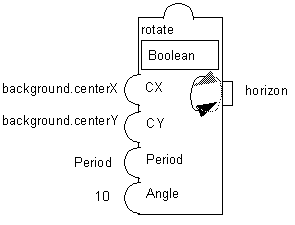
The Rotate accessor (class ) defines a behavior that, when set to IlTrue, makes an object rotate periodically.
The Angle parameter specifies the number of degrees by which the object rotates at every timer tick. The Center X and Center Y parameters define the rotation center. You should not use the center of the rotating node itself for these parameters because the rounding problems that occur while rotating an object might move it slightly. Instead, you should use the center of another fixed object of the prototype. You can make this reference object invisible if necessary.
Parameters
-
Graphic Node: Name of the node to rotate. Can be a graphic node or a subgroup node.
-
Angle: Angle in degrees by which the object is rotated at each step (Float or Integer).
-
Center X: X-coordinate of the rotation center. You can use the centerX accessor for this parameter (Float or Integer).
-
Center Y: Y-coordinate of the rotation center. You can use the centerY accessor for this parameter (Float or Integer).
-
Period (ms): The interval in milliseconds at which the object rotates. It must be an Integer.
Example
This example is presented in the pump prototype of the samples prototype library. When the Rotate accessor is set to true, the nodes will turn by 20 degrees every 10 ms.