Invert
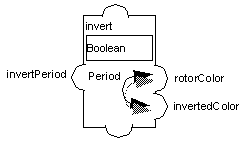
The Invert accessor (class ) inverts the color of an element of your prototype periodically. When the property is set to IlTrue, the color inversion begins. When the attribute is set to IlFalse, the color inversion stops.
While the colors are designated as the foreground and background colors, any colors defined by the prototype or one of its nodes can be used.
Parameters
-
Fg Col. Attribute: Node attribute or prototype value that contains the foreground color.
-
Bg Col. Attribute: Node attribute or prototype value that contains the background color.
-
Period (ms): The interval, in milliseconds, between two inversions of the object colors (Float or Integer).
-
Type: Boolean (whether the accessors are exchanging their values).
Example
This example is presented in the pump prototype of the samples prototype library. When invert is set to true, the values of rotorColor and invertedColor are exchanged periodically. The period is defined by the invert attribute.
The invertPeriod value has an Assign behavior: invert = invert. This forces the accessors to be reevaluated and the internal timer to update its period whenever the period is changed.