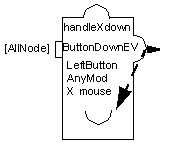
Event
The Event accessor (class ) is used to trigger a behavior in response to user or other application events. When an event of a given type occurs while the mouse pointer is over a node of the prototype, the attribute to which the accessor is attached is evaluated, that is, all its behaviors are set.
While the callback pushes its value to another attribute of the prototype, the event notifies its own attached attribute. The event is thus similar to attaching a Watch accessor to itself after attaching a callback.
Parameters
-
Graphic Node: The name of a graphic node. Events received from the input devices are sent to the accessor over this graphic node to trigger a behavior. The special value [All Nodes] indicates that this value is triggered when any event of the given type reaches any of the graphic nodes of the prototype.
-
Event Type: The event type that triggers the accessor. The type can be any of the standard Views event types: AnyEvent, KeyUp, KeyDown, ButtonDown, ButtonUp, EnterWindow, LeaveWindow, PointerMoved, ButtonDragged, Repaint, ModifyWindow, Visibility, MapWindow, UnMapWindow, Reparent, KeyboardFocusIn, KeyboardFocusOut, DestroyWindow, ClientMessage, and DoubleClick.
-
Detail: The detail of the event. This parameter indicates additional filtering of the events and depends on the event type. For example, for a ButtonDown event, the detail can be: AnyButton, LeftButton, RightButton, MiddleButton, Button4, or Button5. For a KeyDown event, the detail parameter indicates the key, or AnyKey that triggers the accessor. See the IlvEvent class for a list of the valid keys.
-
Modifiers: Indicates which modifiers should be pressed. Possible values are: AnyModifier, NoModifier, Shift, Ctrl, Meta, Alt, Num, Lock, Alt+G, or any combination of the previous modifiers such as Shift+Crtl, Ctrl+Shift+Alt, and so on.
-
Event data to send: The Event attribute that is pushed to the current value. It can be the Type, Detail, X (the horizontal position of the mouse relative to the window), Y (the vertical position of the mouse relative to the window), GlobalX, or GlobalY (the position of the mouse relative to the screen).
Example
The following example shows the transformer prototype with an EventScaleY value in the samples library: