Condition
The Condition accessor (class ) is used to perform a conditional assignment of another attribute when the attribute is changed.
The first parameter defines a condition operator that is applied to the new value of the attribute. For example, if the value of the attribute is changed to 10, the operator parameter is >, and the operand is 5, the condition tested is 10 > 5. If the operator is [Operand_value], the condition tested is only the value of the operand parameter (that is, the new value passed to changeValue is ignored).
Depending on the test result, the attribute specified by the Attribute parameter is set to one of two values: Value if True or Value if False. The parameters Operand, Value if True, or Value if False can be either immediate values (such as 1 or "red"), the names of other attributes that will be queried to get the values used, or an expression containing these immediate values or attribute names.
Parameters
-
Operator: The operator used to test the conditions. It can be one of the following: ==, !=, >=, <, <=, or [Operand_value].
-
Operand: The operand value.
-
Attribute: Prototype value or node attribute that will be set to true or false, depending on the condition.
-
Value if True: Value to which the output is set if the condition is true (or non 0).
-
Value if False: Value to which the output is set if the condition is false (or 0).
-
The type of the accessor is undetermined and irrelevant. However, it needs to be compatible with the operand type.
Example
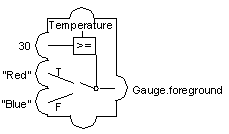
The following example shows the thermo prototype in the samples prototype library. If the temperature attribute is above 30, the gauge is drawn in red. Otherwise, it is drawn in blue.