Attributes and Accessor Objects
The Prototypes package lets you define not only the graphic appearance of your objects, but also their behavior. The behavior of a group is controlled by its attributes (also called properties). These attributes bear distinct names and represent the external interface of the group, that is, how its appearance will be controlled from your application.
The attributes of a group and their behaviors are defined in accessor objects. Each accessor object has a name and a type and implements the effect of setting and/or retrieving the value for the group. Several accessor objects can have the same name, which means they belong to the same attribute. This means that setting an attribute value can have several side effects.
Accessors can be linked to other attributes of objects or to application data. They define state or appearance changes in response to user events or application instructions and, by extension, specify the graphic and interactive behavior of objects. Accessor objects are instances of subclasses of .
In other words, the relationship between accessor objects and values is the following:
-
You interact with a group through its attributes.
-
A group has a set of accessor objects attached to it. Each accessor object is associated with a name, which defines an attribute (or facet) of the BGO.
-
The IlvGroup::changeValue method calls the changeValue methods of all the accessor objects of a given name, thereby setting the attribute value.
-
The IlvGroup::queryValue method calls the queryValue methods of all the accessor objects of a given name, thereby getting the attribute value.
-
The effect of each behavior class is defined by the implementation of its changeValue and queryValue methods.
-
Some accessors can be set through user interaction or by the application, thereby triggering other behaviors in a chain.
The relationship between accessor objects and attributes/behaviors in a group is shown in Relationship Between Accessor Objects, Attributes, and Behaviors:
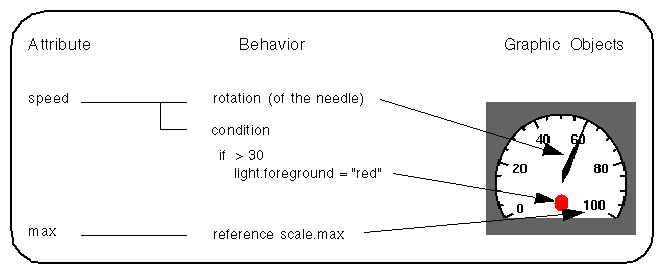
Relationship Between Accessor Objects, Attributes, and Behaviors
This example shows a group representing a gauge. The gauge has two attributes: speed and max.
-
The speed attribute is implemented by two accessor objects, each having a graphic behavior:
A Rotation accessor object—when the speed attribute is changed, this accessor object rotates the needle of the gauge.
A Condition accessor object—when the speed attribute is changed, this accessor object changes the color of the circle if the value is greater than 30.
-
The max attribute is implemented by a Reference accessor object, which references a property of a basic graphic object at the group level. When the max attribute is changed, this accessor object changes the maximum speed of the scale graphic object.
The following types of accessors can be attached to an attribute:
-
Data accessors - State how a data item is to be stored (locally or in a node) and what its type is. They are comparable to variable declarations in a regular programming language. Only one of these accessors should be present for each attribute.
-
Control accessors - Perform conditional instructions, evaluations, and assignments based on other attributes. They take input parameters and can have output effects on other parameters. Typical examples are the Condition accessor, for the conditional assignment, and the Toggle accessor.
-
Notifying accessors - Define the entry points of evaluation cycles. Either the application (when it does a pushValue) or the user (when a callback triggers a Callback accessor) can “push” values, forcing the accessors to handle them. Connections between attributes can be made to propagate the evaluation to other values by means of the Watch and Notify accessors.
-
Display accessors - Define a side effect of the attribute on the visual presentation of the nodes of the group. They correspond to calls to the drawing library in a programming language. When they are set, they change graphic properties, such as rotating a node or changing the visibility of a graphic component.
-
Animation accessors - A special case of display accessors that periodically change a graphic attribute.
-
Miscellaneous accessors - Consist of two accessors that do not fit into the previous categories: the Debug accessor and the Delegate to Prototype accessor.
You will find a full description of all the predefined accessor classes in the section