Getting started with the Gantt JavaScript Web application: an example
Provides an example to help you get started with JViews Gantt JavaScript Web application development.
Describes the steps necessary to create a Gantt JavaScript Web application
Gives an overview of the Gantt Servlet example.
Describes the requirements to install and run this sample.
Creating a Gantt JavaScript Web application
Creating a Gantt JavaScript Web application consists of two steps: developing the server side and developing the client side. The Gantt Servlet example, provided with the distribution, illustrates these steps in this section.
The Gantt Servlet example
The Gantt Servlet example can be found in the following directory:
<installdir>/jviews-gantt/samples/servlet
This example allows you to show a standard Gantt chart of scheduling information in a Web application context.
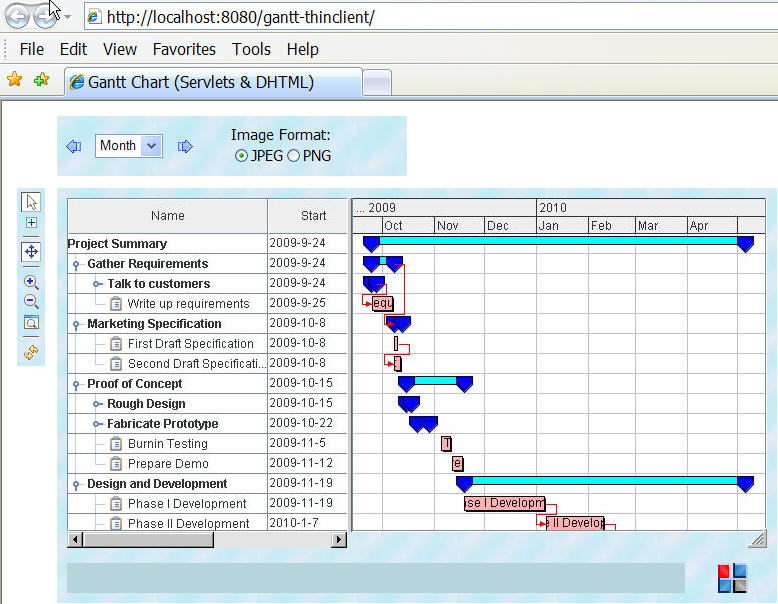
The Gantt Servlet example
The Gantt Servlet example is composed of:
The server side
The server side consists of three Java™ files located in the directory:
<installdir>/jviews-gantt/samples/servlet/src
These files are:
|
File |
Description |
|
A servlet that produces JPEG images from a standard IlvGanttChart component. |
|
|
A Gantt data model that contains the project scheduling information. |
|
|
A basic implementation of IlvGanttServleSupport that handles all the HTTP requests for the servlet. |
The JavaScript client
The JavaScript™ client consists of:
-
The HTML starting page:
<installdir>/jviews-gantt/samples/servlet/web/index.html
-
The set of JViews Framework common JavaScript™ components, located in:
<installdir>/jviews-framework/lib/thinclient/javascript/
and the image icons needed for these components in:
<installdir>/jviews-framework/lib/thinclient/javascript/images
-
The set of Gantt JavaScript components, located in:
<installdir>/jviews-gantt/lib/thinclient/javascript/gantt
Installing and running the Gantt Servlet example
Running the Gantt Servlet example requires a Web server and a Web browser that support JavaScript™. The Web server must support the Servlet API 2.1 or later.
This sample is compatible with the browsers and browser versions listed in the Release notes.
The Gantt Servlet example contains a WAR file (Web Archive):
that allows you to easily install the example on the Web server of your choice. You can check the latest list of servers that support servlets at:
http://java.sun.com/products/servlet/industry.html
For your convenience, the Apache Tomcat™ Web server is supplied with the JViews Gantt distribution. The Gantt Servlet example is pre-installed in Tomcat and is ready to run. TOMCAT is the official reference implementation of the Servlet and JSP™ specifications. To get more information on Tomcat go to http://jakarta.apache.org/tomcat/.
The steps for running the Tomcat Web server supplied with the JViews Gantt installation can be found at:
-
<installdir>/jviews-gantt/samples/servlet/gantt-thinclient.war
If you are running on Microsoft® Windows® then you can find menu items in the Windows "start" menu to start and stop the Tomcat server.
-
Launch a Web browser and open the page: http://localhost:8080/gantt-thinclient
-
For additional details, consult the instructions on how to run the JViews Gantt samples in:
Your browser then shows the Gantt Servlet example.