The CADRG reader
Describes the CADRG readers provided.
Provides general information and illustrates the class relationship for a CADRG Reader.
Describes classes for reading the CADRG format.
Describes the IlvRasterCADRGReader class.
Explains how to create the CADRG Raster reader, the data source and read the data to create images.
Overview
The following figure shows the class relationship for a CADRG Reader.
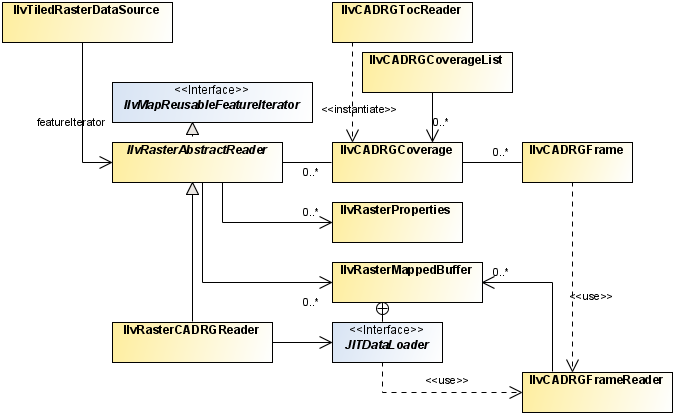
CADRG reader UML diagram
This package contains classes for reading Compressed ARC Digitized Raster Graphics (CADRG) files. The CADRG format is a map format for scanned maps published by the US National Imagery and Mapping Agency (NIMA). The CADRG readers provided by JViews Maps for Defense are based on specification document MIL-C-89038 October 6th, 1994. Note that CADRG data is available on the maps data DVD supplied with the installers for JViews Maps for Defense.
To automatically read a CADRG coverage using the JViews load-on-demand mechanism, you can use an IlvCADRGLayer. A CADRG database covers an area with scanned maps of various scales. It is composed of:
-
A root directory (generally called the rpf directory) that contains a table of contents file, called A.TOC that can be read using an IlvCADRGTocReader.
-
One or more subdirectories, each corresponding to a specific coverage. These subdirectories contain the CADRG frames that make up the coverage. A complete CADRG frame is made up of 36 subframes, 6 by 6. Generally CADRG coverages are in the geographic projection except for the poles, for which the azimuthal equidistant projection is more appropriate. These subdirectories contain the CADRG frames that make up the coverage and can be read using an IlvCADRGFrameReader.
-
Other general information, such as overviews of the area represented in the coverage, and one or more legend files.
The CADRG structure is particularly suited to load-on-demand and allows you to select the coverage that is best adapted to a given display scale.
The source code for the Map Builder demonstration, which contains all of the code described in this section, can be found at <installdir> /jviews-maps/samples/mapbuilder/index.html
Classes for reading the CADRG format
Describes classes for reading the CADRG format.
Introduces the classes in the ilog.views.maps.format.cadrg package.
Describes the IlvCADRGTocReader class.
Describes the characteristics of the IlvCADRGFrameReader class
Explains how to create an IlvCADRGFrameReader object.
Describes the IlvCADRGLayer class.
Provides an example which demonstrates how to use the classes.
Overview
The ilog.views.maps.format.cadrg package includes the following classes:
-
IlvCADRGTocReader for reading the table of contents of a CADRG volume.
-
IlvCADRGFrameReader for reading a CADRG frame.
-
IlvCADRGLayer for implementing load-on-demand for the CADRG format.
The IlvCADRGTocReader class and the CADRG model
The IlvCADRGTocReader class allows you to read a table of contents file (the A.TOC file). It gives access to the elements of the CADRG volume according to the following object model:
-
The CADRG coverages are represented by instances of the class IlvCADRGCoverage.
-
The CADRG frames are represented by instances of the class IlvCADRGFrame class.
The following example reads the table of contents of a CADRG volume:
IlvCADRGTocReader tocReader = new IlvCADRGTocReader(fileName);
Enumeration frames = tocReader.getOverviewFrames();
while (frames.hasMoreElements()) {
IlvCADRGFrame frame = (IlvCADRGFrame) frames.nextElement();
IlvMapFeatureIterator iterator = frame.makeReader(false);
mapLoader.load(iterator);
}
In this example, mapLoader is an instance of the IlvMapLoader class. For details about the map loader, see Creating a map application using the API.
The IlvCADRGFrameReader class
The IlvCADRGFrameReader class allows you to read a CADRG frame directly. It has the following characteristics:
-
It implements the IlvMapFeatureIterator interface.
-
For each CADRG subframe added, it returns one IlvMapFeature object. The map feature has:
-
Geometry of type IlvMapImage.
-
No attributes.
-
-
The default renderer is an IlvDefaultImageRenderer object. Note that this renderer is not able to reproject images.
Creating an IlvCADRGFrameReader object
To create an IlvCADRGFrameReader object :
-
Call the makeReader() method with the name of the frame to be read, see The IlvCADRGTocReader class and the CADRG model.
or
Provide the name of the frame to be read to the class constructor.
or
Provide the URL to the frame to be read to the class constructor.
The IlvCADRGLayer class
The IlvCADRGLayer class is included for compatibility with previous versions of JViews Maps. It is recommended that you use the IlvRasterCADRGReader and the free tile mechanism to take advantage of image reprojection and pixel-on-demand features.
The class implements load-on-demand for a CADRG coverage. It is created from an instance of the IlvCADRGCoverage class. The size of a tile corresponds to the size of a CADRG frame. This implementation of a tiled layer works exclusively with the geographic projection for the nonpolar zones of CADRG.
Example of using the CADRG reader to read frames and create layers
This example is given for compatibility reason for versions of JViews Maps. It is recommended that you use the IlvRasterCADRGReader and the free tile mechanism to take advantage of image reprojection and pixel-on-demand features.
The code that follows demonstrates how to use the classes described in Classes for reading the CADRG format.
The complete source code for this example is in the following file:
<installdir> /jviews-maps/codefragments/readers/src/CADRGReader.java.
/**
* Examples of how to use the CADRG reader package.
*/
public class CADRGReader {
IlvManager manager = new IlvManager();
/**
* Reads a single CADRG frame.
*/
public void readSingleFrame(String frameFileName)
throws IlvMapFormatException,
IOException,
IlvMapRenderException,
IlvCoordinateTransformationException {
//Instantiate a reader.
IlvCADRGFrameReader freader = new IlvCADRGFrameReader(frameFileName,
false);
// Retrieve the default renderer.
IlvFeatureRenderer renderer = freader.getDefaultFeatureRenderer();
((IlvDefaultImageRenderer)renderer).getImageRenderingStyle().
setHighQualityRendering(true);
// Create a dummy transformation. CADRG files cannot be reprojected.
IlvCoordinateTransformation tr =
IlvCoordinateTransformation.CreateTransformation(null, null);
// Retrieve the first map feature.
IlvMapFeature feature = freader.getNextFeature();
while (feature != null) {
// Create corresponding graphic object.
IlvGraphic graphic = renderer.makeGraphic(feature, tr);
// Adds it to a manager.
manager.addObject(graphic, false);
// Loop on features.
feature = freader.getNextFeature();
}
}
/**
* Create an IlvCADRGLayer for each coverage.
* Each layer being a load-on-demand layer.
*/
public void readFromToc(String aDotToc)
throws FileNotFoundException,
IlvMapFormatException,
IOException {
// Create table of content reader.
IlvCADRGTocReader tocReader = new IlvCADRGTocReader(aDotToc);
// Retrieve coverages.
IlvCADRGCoverage coverages[] = tocReader.getCoverages();
// Create a layer for each coverage, add it to the manager.
for(int i = 0; i < coverages.length; i++) {
IlvCADRGLayer layer = new IlvCADRGLayer(coverages[i]);
manager.addLayer(layer, -1);
}
}
The IlvRasterCADRGReader class
The IlvRasterCADRGReader class creates images for a set of CADRG coverages.
Using the IlvRasterCADRGReader class to create images
Creating the reader
To create the CADRG Raster reader:
-
Use the IlvRasterCADRGReader class:
IlvRasterCADRGReader imageReader = new IlvRasterCADRGReader();
Working with coverages
To use the CADRGCoverage class:
-
Read the CADRG table of contents:
IlvCADRGTocReader tocReader = new IlvCADRGTocReader(tocFileName);
-
Retrieve the CADRG coverages you require:
IlvCADRGCoverage coverages[]= tocReader.getCoverages();
To provide better control over the displayed data, you can use more than one IlvRasterCADRGReader and arrange coverages in different layers.
Organizing layers
To organize layers so that they contain coverages of the same resolution:
-
Use the IlvCADRGCoverageList :
IlvCADRGCoverageList list = new IlvCADRGCoverageList();
list.addCoverages(tocFileName, tocReader.getCoverages());
Integer scales[] = list.getOrderedScaleList();
String scaleDesc[] = list.getOrderedScaleDescription();
IlvCADRGCoverage coverages[] = list.getCoverageList(scales[i]);
-
Retrieve all the coverages of the same resolution and add the coverages you want to display to the raster reader. For example:
for(int iCov=0;iCov<coverages.length;iCov++) {
imageReader.addCADRGCoverage(coverages[iCov]);
}
Creating a data source
To create a data sourceand link it with the manager properties:
-
Define and insert the data source into the data source tree:
IlvMapDataSource imageDataSource =
IlvRasterDataSourceFactory.buildTiledImageDataSource(manager,imageReader,
true,true,null);
IlvMapDataSourceModel dataSourceModel =
IlvMapDataSourceProperty.GetMapDataSourceModel(manager);
dataSourceModel.insert(imageDataSource);
Reading the data
To start reading your data:
-
Start your data source:
dataSourceModel.start();
Starting the data source creates the necessary tiled layers, tile managers and IlvRasterIcon instances to manage pixel-on-demand and progressive display of the geo-referenced image.
For further information, see: Raster data sources
-
Raster data sources, for defense-specific data sources.
-
Introducing the main classes and Creating a map application using the API for non defense-specific data sources, properties, tiling, and pixel-on-demand.