Customizing passive devices
Passive devices are business objects without an object state. The passive information is graphically represented with an icon as illustrated in following image:
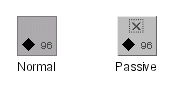
Properties for passive devices
You can customize a passive representation using the CSS properties listed in the following table.
|
Property Name |
Type |
Default Value |
Description |
|
passiveIcon |
Image |
ilog/tgo/ilt_passive.png |
Denotes the icon that is used in the passive representation. |
|
passiveIconVisible |
boolean |
false |
Denotes whether the passive icon is displayed or not. |
How to represent passive devices
Predefined business objects can have states and alarms. When these objects do not have an object state set, they are considered to be passive devices. This information can be graphically represented by the passive icon. The following CSS extract shows how you can customize the predefined business objects to show this icon when the object does not have an object state:
object."ilog.tgo.model.IltObject" {
passiveIconVisible: true;
}
object."ilog.tgo.model.IltObject"[objectState] {
passiveIconVisible: false;
}


