Customizing alarm count attributes
Representing alarm counts
The alarm count attributes of IltObject are represented in the table component using:
-
IltDefaultAlarmCountGraphic for raw alarms and traps
-
IltImpactAlarmCountGraphic for impact alarms.
The following table interprets some graphical representations of alarm counts.
|
Representation |
Description |
|
|
99500 (+/- 0.5%) outstanding alarms of severity Minor, some outstanding alarms of lower severity, and some new alarms of severity Warning |
|
|
4 new alarms of severity Warning |
|
|
1 Critical acknowledged alarm |
|
|
5 new impact alarms of severity Critical High, some outstanding alarms of lower severity |
|
|
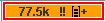
77500 (+/- 0.5%) outstanding alarms of severity Major High, some outstanding alarms of lower severity, and some new alarms of severity Minor High |


Alarm count representation details
Customizing alarm count representations
The alarm count representation can be customized using the CSS properties listed in the following table.
|
Property Name |
Type |
Default Value |
Description |
|
innerBorderColor |
Color |
null |
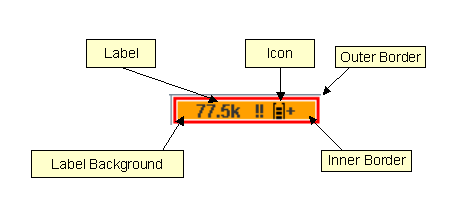
Color of the inner border. |
|
innerBorderVisible |
Boolean |
false |
Use true to show the inner border. The inner border should be displayed when the alarm count has both new and acknowledged alarms. |
|
innerBorderWidth |
int |
1 |
Width of the inner border. |
|
label |
String |
null |
Label used to display the alarm count. This text is parsed and laid out to conform to the format. |
|
labelBackgroundColor |
Color |
null |
Color of the label background. The color corresponds to the severity of the most severe new alarm. |
|
outerBorderColor |
Color |
null |
Color of the outer border. The color corresponds to the severity of the most severe outstanding alarm. |
|
outerBorderWidth |
int |
2 |
Width of the outer border. |
|
icon |
Image |
null |
Icon used to compose the alarm count. |
|
iconVisible |
Boolean |
true |
Determines whether the icon is visible or not. |
|
iconPosition |
int |
IlvConstants.TRAILING |
Position of the icon relative to the label. If the label follows the alarm count pattern, the icon is placed before or after the alarm severity text. Possible values: IlvConstants.LEADING or IlvConstants.TRAILING |
The CSS functions listed in the following table are useful to provide values for the alarm count representation.
|
Function Name |
Description |
Usage |
|
alarmCount |
The outstanding alarm count label |
Parameters: Alarm type or severity. The alarm type can have one of the following values: Default for raw alarms or traps Impact for impact alarms Specifying no parameter is equivalent to Default. The severity is the String representation of a severity or an IltAlarmSeverity. Examples: @|alarmCount(); @|alarmCount("Default"); @|alarmCount("Impact"); @|alarmCount("Raw.Major"); @|alarmCount("Impact.CriticalHigh"); |
|
newAlarmCount |
The new alarm count label |
See alarmCount |
|
acknowledgedAlarmCount |
The acknowledged alarm count label |
See alarmCount |
|
highestSeverity |
The severity of the most severe outstanding alarm |
See alarmCount |
|
highestNewSeverity |
The severity of the most severe new alarm |
See alarmCount |
|
highestAcknowledgedSeverity |
The severity of the most severe acknowledged alarm |
See alarmCount |
|
alarmSummary |
The total amount of new and outstanding alarms |
See alarmCount |
|
newAlarmSummary |
The total amount of new alarms |
See alarmCount |
|
acknowledgedAlarmSummary |
The total amount of acknowledged alarms |
See alarmCount |
|
severityColor |
The color corresponding to a severity |
Parameters: IltAlarmSeverity or the String representation of an IltAlarmSeverity. Examples: @|severityColor("Raw.Major"); @|severityColor(@|highestSeverity()); @|severityColor(@|highestSeverity("Impact")); |
|
severityIcon |
The icon corresponding to a severity |
Parameters: IltAlarmSeverity or the String representation of an IltAlarmSeverity. Examples: @|severityIcon("Raw.Major"); @|severityIcon(@|highestSeverity()); @|severityIcon(@|highestSeverity("Impact")); |
How to reproduce the JViews TGO 4.0 styling for alarm count attributes
The following style sheet extract reproduces the JViews TGO 4.0 styling for alarm count attributes.
// IltObject alarmCount attribute
object."ilog.tgo.model.IltObject/alarmCount" {
class: ilog.tgo.graphic.IltDefaultAlarmCountGraphic;
label: '@|alarmCount()';
toolTipText: '@|alarmSummary()';
labelBackgroundColor: '@|severityColor(@|highestNewSeverity())';
outerBorderColor: '@|severityColor(@|highestSeverity())';
innerBorderColor: white;
innerBorderVisible: '@|highestNewSeverity()!=null &&
@|highestAcknowledgedSeverity()!=null';
}
// IltObject newAlarmCount attribute
object."ilog.tgo.model.IltObject/newAlarmCount" {
class: ilog.tgo.graphic.IltDefaultAlarmCountGraphic;
label: '@|newAlarmCount()';
toolTipText: '@|newAlarmSummary()';
labelBackgroundColor: '@|severityColor(@|highestNewSeverity())';
outerBorderColor: '@|severityColor(@|highestNewSeverity())';
innerBorderColor: white;
innerBorderVisible: false;
}
// IltObject impactAlarmCount attribute
object."ilog.tgo.model.IltObject/impactAlarmCount" {
class: ilog.tgo.graphic.IltImpactAlarmCountGraphic;
label: '@|alarmCount("Impact")';
toolTipText: '@|alarmSummary("Impact")';
labelBackgroundColor: '@|severityColor(@|highestNewSeverity("Impact"))';
outerBorderColor: '@|severityColor(@|highestSeverity("Impact"))';
innerBorderColor: white;
innerBorderVisible: '@|highestNewSeverity("Impact")!=null &&
@|highestAcknowledgedSeverity("Impact")!=null';
}
// IltObject newImpactAlarmCount attribute
object."ilog.tgo.model.IltObject/newImpactAlarmCount" {
class: ilog.tgo.graphic.IltImpactAlarmCountGraphic;
label: '@|newAlarmCount("Impact")';
toolTipText: '@|alarmSummary("Impact")';
labelBackgroundColor: '@|severityColor(@|highestNewSeverity("Impact"))';
outerBorderColor: '@|severityColor(@|highestNewSeverity("Impact"))';
innerBorderColor: white;
innerBorderVisible: false;
}
How to reproduce the JViews TGO 3.5 styling for alarm count attributes
The following style sheet extract reproduces the styling obtained in JViews TGO 3.5 for the IltObject alarm count attributes. You may want to use it to improve performance or to ensure compatibility with previous versions of JViews TGO.
// IltObject alarmCount attribute
object."ilog.tgo.model.IltObject/alarmCount" {
class: javax.swing.JLabel;
text: @|alarmCount();
toolTipText: @|alarmCount();
labelFont: sansserif-plain-12;
labelBackground: '@|severityColor(@|highestSeverity())';
}
// IltObject newAlarmCount attribute
object."ilog.tgo.model.IltObject/newAlarmCount" {
class: javax.swing.JLabel;
text: @|alarmCount();
toolTipText: @|alarmCount();
labelFont: sansserif-plain-12;
labelBackground: '@|severityColor(@|highestNewSeverity())';
}
// IltObject impactAlarmCount attribute
object."ilog.tgo.model.IltObject/impactAlarmCount" {
class: javax.swing.JLabel;
text: @|alarmCount("Impact");
toolTipText: @|alarmCount("Impact");
labelFont: sansserif-plain-12;
labelBackground: '@|severityColor(@|highestSeverity("Impact"))';
}
// IltObject newImpactAlarmCount attribute
object."ilog.tgo.model.IltObject/newImpactAlarmCount" {
class: javax.swing.JLabel;
text: @|newAlarmCount("Impact");
toolTipText: @|newAlarmCount("Impact");
labelFont: sansserif-plain-12;
labelBackground: '@|severityColor(@|highestNewSeverity("Impact"))';
}
How to display the alarm count for a specific alarm severity
Provided there is a MyObject business class, with super-class IltObject and a rawMajorAlarmCount attribute, the following style sheet produces an alarm count representation specific to raw alarms of severity Major.
// IltObject alarmCount attribute
object."MyObject/rawMajorAlarmCount" {
class: ilog.tgo.graphic.IltDefaultAlarmCountGraphic;
label: '@|newAlarmCount("Raw.Major")';
toolTipText: '@|newAlarmSummary("Raw.Major")';
labelBackgroundColor: '@|severityColor(@|highestNewSeverity("Raw.Major"))';
outerBorderColor: '@|severityColor(@|highestNewSeverity("Raw.Major"))';
innerBorderColor: white;
innerBorderVisible: false;
}


