Deleting an orthodromy measure
Explains how orthodromy measures can be deleted.
Summarizes the different ways an orthodromy measure can be deleted.
Explains how to delete all measures in a layer.
Explains how to delete a single measure.
Overview
You can delete all the orthodromy measures contained in a layer or delete each measure individually.
Deleting all orthodromy measures in a layer
To delete all measures in a layer:
-
Right-click a measure in the Map Layers pane and select Delete from the pop-up menu.
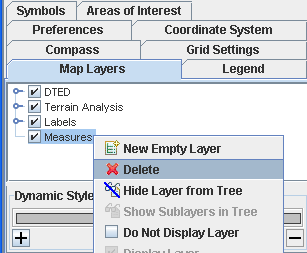
Delete all orthodromy measures
Deleting a single orthodromy measure
To delete an individual orthodromy measure:
-
Right-click a measure in the Map View and select Delete Measure from the pop-up menu.
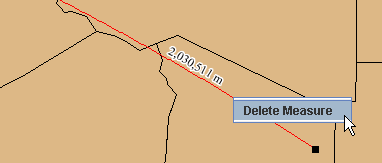
Delete an individual orthodromy layer


