Creating Gantt charts from templates
A template is a predefined project with a style sheet designed for a specific type of application or style of presentation. It includes an appropriate data model and some sample activities, resources, constraints, and reservations with user-defined types. You can use a template as a starting point for a Gantt chart.
When you use the New Gantt Chart Wizard, you can create a Gantt chart by loading your data and applying basic settings, or you can load a template.
-
To start a new chart based on a supplied template, choose File > New from Wizard. The New Gantt Chart Wizard starts.
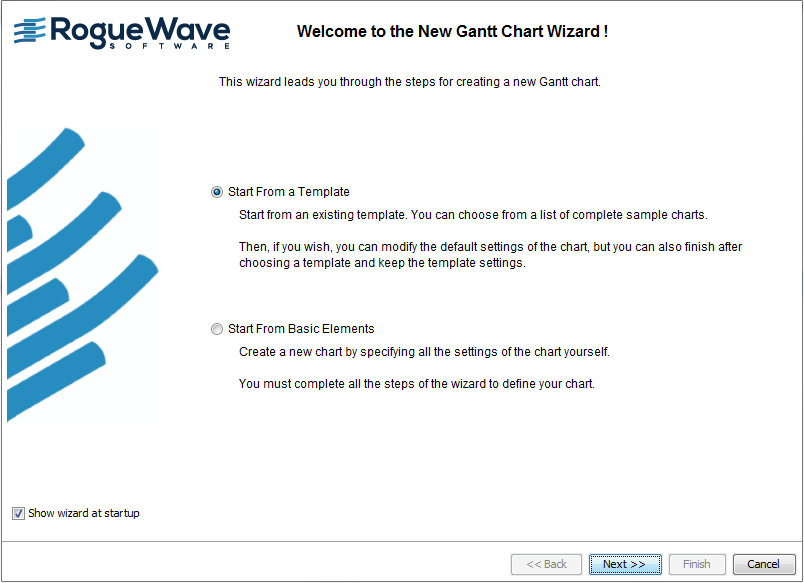
The following figure shows how to choose the template option.
-
Select the option to start from a predefined template.
The following templates are available:
-
Basic Gantt Chart
-
Basic Schedule Chart
-
Gantt Status Chart
-
Schedule Chart for Plant PowerOps
-
Schedule Chart for Transportation Planning
These templates reflect typical uses of JViews Gantt. Each may have different styling options and different default styles for data.
-
-
Click Next and choose the Gantt Status Chart.
The Gantt Status Chart template is an enhanced activity-oriented chart which includes the completion attribute in the data and the user-defined type critical. If you click Finish, you will have an activity-oriented chart that displays critical activities in red and shows the percentage completion as a narrow bar along the center of the activity bar.
The following figure shows an enhanced activity-oriented chart with template data.
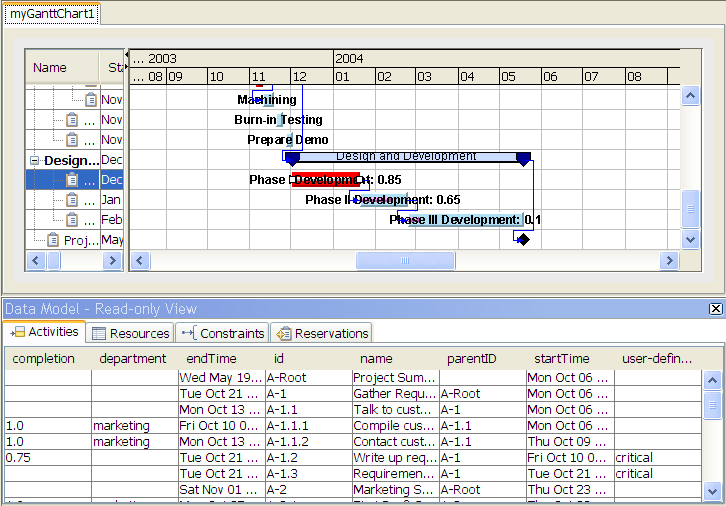
Note that the chart is shown in Chart Editing Mode with the data model read-only view.


