Extended Progress Control
Derived from MFC's CProgressCtrl, SECProgressCtrl offe
- Smooth fill with percentages.
- Multidirectional progressions (left to right, right to left, bottom to top, or top to bottom).
- Fully configurable foreground and background coloring.
- Custom status text with configurable fonts.
The progress control also offers powerful virtual hooks for you to provide your own customizations easily.
In addition, SECProgressCtrl supports the automatic advancing of the progress status in response to timer events. Refer to StepOnTimer() in the Objective Toolkit Class Reference for more information.
Example Progress Control

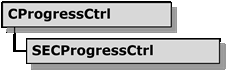
The class hierarchy for the progress control is as follows:
Objective Toolkit SECProgressCtrl Class Hierarchy
On this page:
Using SECProgressCtrl
You can use objects instaAttachProgress() method or you can create the control dynamically via the Create() method.
To attach an SECProgressCtrl instance to an progress control resource:
Call the AttachProgress() method with the control ID of the progress control you want to attach.
m_wndProgress.AttachProgress(IDC_PROGRESS,this);
To create an SECProgressCtrl instance dynamically:
1. Create a unique control ID for the control. In Visual Studio, you can create a control ID in the Resource Includes dialog.
2. Call the Create() method.
CRect rect(0,0,100,50); // initial rectangle
m_wndProgress.Create(WS_CHILD|WS_VISIBLE,rect, this,IDC_PROGRESS1);
Customizing SECProgressCtrl
You can use the following extended styles to customiz
Extended Styles for SECProgressCtrl
|
Extended style flag |
Description |
|
|
Bar progresses vertically |
|
|
If horizontal, bar progresses right to left |
|
|
If vertical, bar progresses top to bottom |
|
|
Show text percentages on bar |
|
|
Show text on bar |
|
|
If text shown, align text left |
|
|
If text shown, align text right |
|
|
If text shown, center the text |
|
|
Has look and feel of CProgressCtrl |
|
|
|
You can specify these styles as parameters to the Create() and SetExStyle() methods. By default, the progress bar is horizontal and progresses left to right with centered percentages. You can use the preceding flags to modify the default behavior. In addition, the application can configure the font, foreground, and background color at run time.
Extending SECProgressCtrl
Almost every method in SECProgressCtrl is virtua
Virtual Callbacks in SECProgressCtrl
|
Method |
Description |
|
|
Override to alter a progress string before display. |
|
|
Paint the filled portion of the progress bar. |
|
|
Paint the empty portion of the progress bar. |
|
|
Paint the progress text, if any. |