User-Tools Menu
Objective Toolkit’s user-tools menu classes implement a user-configurable Tools menu like the one in Microsoft Visual Studio. A user-tool is an executable that the application can spawn programmatically. The us
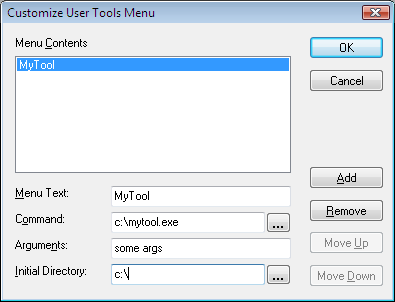
Example User-Tools Dialog
On this page:
The User-Tools Menu Classes
Two classes are involved in the imple
User-Tool Menu Class Hierarchy

SECUserTool
TheSECUserTool class provides an abExecute() method that uses these attributes to launch the user-defined tool.
SECUserToolsDlg
The SECUserToolsDlg class implements a user-tools dia
Using the User-Tools Menu Classes
To add user-tool support to your application:
1. Add a CObArray member to your ma
2. Instantiate an SECUserTool object and add it to the CObArray.
3. Call the SetMenuText() method to set the menu text associated with the user-tool.
4. Call the SetCommand() method to set the absolute path and filename of the executable for the user-tool.
5. Call the SetArgs() method to set the command-line arguments that are passed to the user-tool upon execution.
6. Call the SetDirectory() method to set the absolute path of the directory in which the user-tool is initially executed.
7. Alternatively, instantiate an SECUserToolsDlg dialog and initialize it by calling SetToolsArrayPtr() with the array of SECUserTool objects. Activate the dialog, which automatically performs calls the preceding methods using the information that the user provides for each user-tool.
To execute a user-tool:
Call the Execute() method and pass the pReplacements parameter to run the user-tool with the specified arguments and initial directory.
To make a copy of a user-tool:
Call the Clone() method.
To serialize an array of user-tools:
Use the ReadUserToolFile() or WriteUserToolFile() global function.
To append an array of user-tools to a menu:
Use the AppendUserTools() function.
To delete an array of user-tools:
Use the EmptyUserToolArray() function.
User-Tool Menu Sample
The Objective Toolkittoolmenu sample (Samples\Toolkit\MFC\UIext\toolmenu) demonstrates the capabilities of the us