XML-enabling the document class
Using the SECXMLDocAdapter_T wrapper class
The SFL library provides a very handy wrapper class, SECXMLDocAdapter_T, for adding XML serialization to your existing CDocument class. To use this template, simply create a new class that publicly inherits from the template. The template argument is your existing document class.
class CDesignDocXML : public sfl::SECXMLDocAdapter_T<CDesignDoc>
{
...
// Our required override of XMLSerialize
void XMLSerialize(sfl::SECXMLArchive &ar);
// This method is invoked by the framework to determine
// what the XML tag name will be for our document
virtual void GetElementType(LPTSTR str)
{
_tcscpy(str, _T("DiagramDocument"));
}
};
Note: The sfl:: scope declaration is a typedef for the stingray::foundation namespace. You can just as easily add the directive using namespace stingray::foundation; to your header files (or stdafx.h). However, we have chosen to use the sfl:: notation to clearly document where SFL framework classes are being used.
We must provide an implementation of the pure virtual SECXMLDocAdapter_T::XMLSerialize() method. For now, we'll simply provide the boilerplate code.
void CDesignDocXML::XMLSerialize(sfl::SECXMLArchive &ar)
{
if(ar.IsStoring())
{
// Write out XML
}
else
{
// Read in XML
}
}
We provide an override of the GetElementType() method so that the XML framework will know what to call the top-level tag in the XML document. Our resulting XML will look like this:
<?xml version="1.0" standalone="yes"?>
<DiagramDocument>
<!-- document data will be child nodes of this top-level node -->
</DiagramDocument>
Modifying the base application
Now that we have a document class capable of participating in the SFL XML framework, we need to make some small modifications to the application.
In the application object's ::InitInstance() we'll add logic to initialize the OLE libraries and the SFL framework:
BOOL CXMLSerTutApp::InitInstance()
{
// SFL-XML
// Required SFL framework initialization
AfxOleInit();
sfl::SECXMLInitFTRFactory();
...
Change the application's CDocTemplate to use the new XML-enabled document class:
CMultiDocTemplate* pDocTemplate;
pDocTemplate = new CMultiDocTemplate(
IDR_XMLSERTYPE,
RUNTIME_CLASS(CDesignDocXML), // new XML-enabled doc class
RUNTIME_CLASS(CChildFrame),
RUNTIME_CLASS(CDesignView));
AddDocTemplate(pDocTemplate);
...
}
Adding menu commands
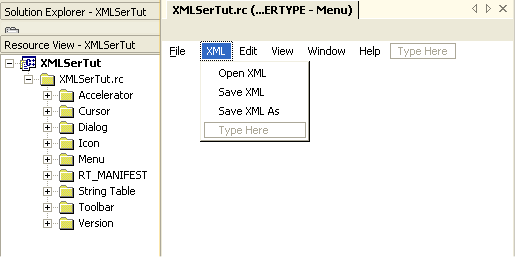
We'll edit the menu resource to add some entries for loading and saving XML files. This is not absolutely required since the framework will actually parse the file extension when you load or save your document. If the .xml extension is found, the XML framework will call your document's XMLSerialize() override. Otherwise, your base class Serialize(CArchive& ar) method will be invoked.
Menu Commands
Menu command handlers
To handle the menu commands, we make some MESSAGE_MAP entries in our new document class (the one we created from the template and the original document class). You can choose any id value you want for the menu commands, as they aren't predefined in the SFL headers. You do not need to write any message handlers, because they have been provided by the template base class.
BEGIN_MESSAGE_MAP(CDesignDocXML, CDocument)
//{{AFX_MSG_MAP(CDesignDocXML)
// Our custom menu commands mapped to the template
// base class handlers
ON_COMMAND(ID_FILE_OPENXML, OnSECFileOpenXML)
ON_COMMAND(ID_FILE_SAVEXML, OnSECFileSaveXML)
ON_COMMAND(ID_FILE_SAVEXMLAS, OnSECFileSaveXMLAs)
//}}AFX_MSG_MAP
END_MESSAGE_MAP()


