Tree Control/Tree View Styles
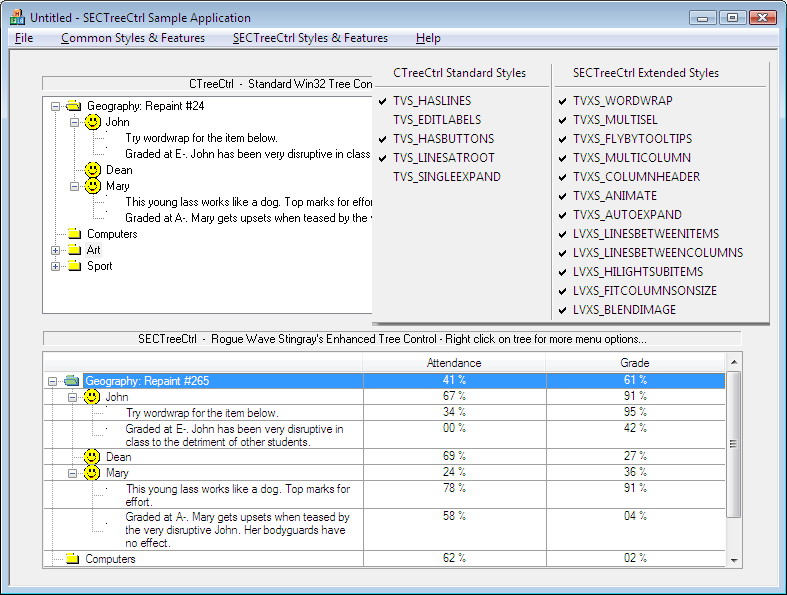
The styles of the tree control are controlled by style flags. The user can modify the styles at run time.
Tree Control Style Flags
|
Tree Control Style Flag |
Description |
|
|
Prevents the tree view control from sending |
|
|
Allows the user to edit the labels of tree view items. |
|
|
Displays plus (+) and minus (-) buttons next to parent items. The user clicks the buttons to expand or collapse a parent item's list of child items. To include buttons with items at the root of the tree view, you need to specify |
|
|
Uses lines to show the hierarchy of items. |
|
|
Uses lines to link items at the root of the tree view control. This value is ignored if |
|
|
Causes a selected item to remain selected when the tree view control loses focus. |
|
|
Displays the column header. This style removes the |
|
|
Enable tooltips. |
|
|
Enables the user to select multiple items. |
|
|
Enables word wrapping of text if the first column is narrow. Specifying this style automatically enables the |
|
|
Disables multiple selection of items. |
|
|
The item column fills the width not occupied by subitem columns. |
|
|
Enable tooltips for additional columns. The |
|
|
|
|
|
Paints vertical lines between columns. |
|
|
Paints horizontal lines between items. |
|
|
Prevents automatic resizing of column 0 when a column is deleted. |
|
|
Specifies that additional columns do not display column headers. This style is automatically removed by specifying the |
|
|
Enables word wrapping of item text if the column is narrow. The |
|
|
Reserved. |
The following styles are not supported by SECTreeCtrl or SECTreeView:
TVS_CHECKBOXES
TVS_FULLROWSELECT (use LVXS_HILIGHTSUBITEMS)TVS_INFOTIP
TVS_NONEVENHEIGHT
TVS_NOSCROLL (use LVS_NOSCROLL)TVS_NOTOOLTIPS (use LVXS_FLYBYTOOLTIPS/TVXS_FLYBYTOOLTIPS)TVS_RTLREADING
TVS_SINGLEEXPAND
TVS_TRACKSELECT
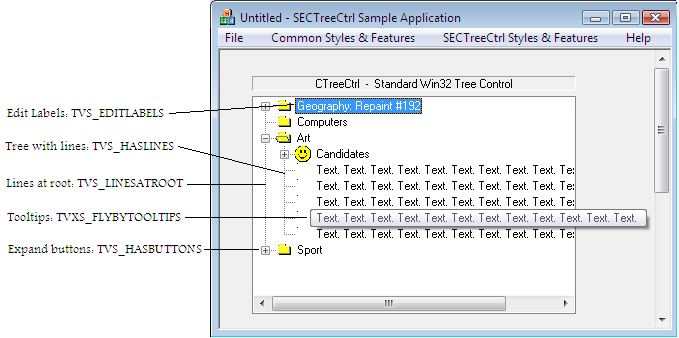
The following figure illustrates some of the standard styles that the Objective Toolkit tree control shares with CTreeCtrl in addition to TVXS_FLYBYTOOLTIPS.
Examples Tree Control Styles
The following figure illustrates some of the extended styles.
Examples Tree Control Extended Styles