Reviewing the Steps to a Functional Graph
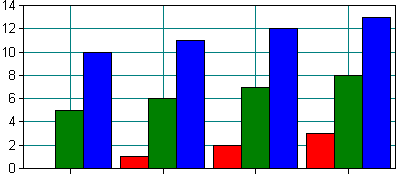
Now you should be able to compile and run the ChartApp executable. The display should look like Chart displayed by the Step 1 program.
Chart displayed by the Step 1 program
Here is a brief recap of what was done to turn a basic MDI application into a charting program:
-
We included the ochart.h header file in the stdafx.h header for the project.
-
Using search and replace, we changed the base class of the view from CView to SRGraphView and the base class of the document to CGraphDoc. A chart object is already a member of CGraphDoc.
-
In the view class, we modified the OnDraw() routine to draw the chart object and edited the OnBeginPrinting() routine to call the base class version.
-
In the document, we added a call to the chart object’s Serialize() function. In the OnNewDocument() routine, we set up a simple display component and created some dummy data to plot.
-
In the resource’s compile-time directives, we included the SRGRes.rc file. We added a menu item for page setup and explicitly defined the menu item ID as 0xd103. Similarly, we added menus for the graph editor and the zoom-out function, and gave them IDs 0xd101 and 0xd102, respectively. Finally, we added three toolbar buttons and gave them IDs to match the new menu items.


