Create CStatic-based Control for Use in a Dialog Box
When using Objective Chart to provide a control in a dialog box, it is convenient to create a wrapper class based on CStatic. An object of this class can be used as a member variable in your dialog box code, and ClassWizard can insert it for you automatically. Therefore, before creating the dialog, we will create a control class to display the chart. The chart can be initialized and modified via the member variable used to store the control in the dialog. You'll use ClassWizard to create a new MFC class named CGraphControl based on CStatic.
-
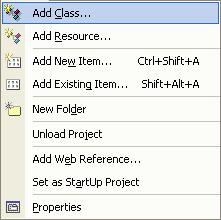
Choose Project |Add Class from the menu to invoke the Add Class dialog.
Adding a class
-
Click Add Class.
-
A dialog with icons for different types of classes will appear. Select the "MFC Class" Icon and click the OK button.
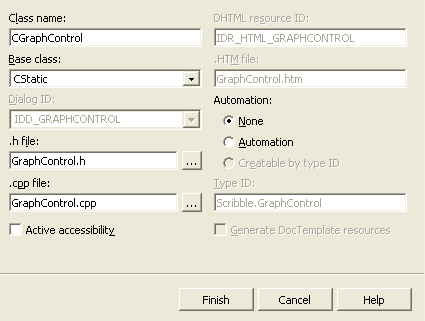
New Class Dialog Box
-
Type CGraphControl as the class name.
-
From the drop-down list, select CStatic as the Base class.
-
Click Finish.
-
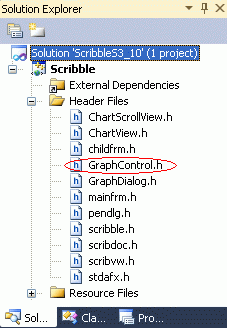
Open the header file GraphControl.h.
Locating the GraphControl.h file
-
To define a new SRGraph member variable and several member functions, add the lines that are highlighted in blue text in the following code:
// CGraphControl window
class CGraphControl : public CStatic
{
// Construction
public:
CGraphControl();
// Attributes
public:
// Operations
public:
// Overrides
// ClassWizard generated virtual function overrides
//{{AFX_VIRTUAL(CGraphControl)
//}}AFX_VIRTUAL
// Implementation
public:
SRGraph m_Graph;
virtual void SetTitle(LPCSTR lpText);
virtual void SetIndexText(int nIndex,LPCSTR lpText);
virtual void SetHeaderText(int nGroup,LPCSTR lpText);
virtual void SetGraphData(int nIndex,int nGroup,double d);
virtual ~CGraphControl();
// Generated message map functions
protected:
//{{AFX_MSG(CGraphControl)
// NOTE - the ClassWizard will add and remove member
// functions here.
afx_msg void OnPaint();
afx_msg BOOL OnEraseBkgnd(CDC* pDC);
//}}AFX_MSG
CHART_DECLARE_MESSAGE_MAP()
};
///////////////////////////////////////////////////////////////////////////
//{{AFX_INSERT_LOCATION}}
// Microsoft Visual C++ will insert additional declarations
// immediately before the previous line.
#endif // !defined(AFX_GRAPHCONTROL_H__53D1342B_C640_48C8_82FA_07E040E1F1A4__INCLUDED_)
-
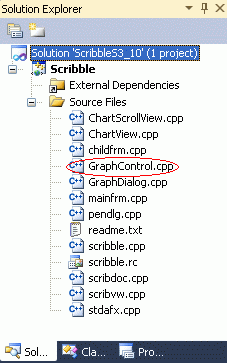
Locate the CGraphControl constructor (in GraphControl.cpp)...
and add code to create a chart with default settings. (See how to do this in the next step.)
GraphControl.cpp
-
At the end of the implementation file (GraphControl.cpp), add message handlers for the OnPaint() and OnEraseBkgnd() messages and the other member functions. Use the highlighted code from the following code segment.
// GraphControl.cpp : implementation file
//
#include "stdafx.h"
#include "Scribble.h"
#include "GraphControl.h"
#ifdef _DEBUG
#define new DEBUG_NEW
#undef THIS_FILE
static char THIS_FILE[] = __FILE__;
#endif
////////////////////////////////////////////////////////////
// CGraphControl
CGraphControl::CGraphControl()
{
// On initialization we can create a default chart
SRGraphTitle *pT=new SRGraphTitle;
pT->SetMeasurement(CX_PERCENT);
pT->SetRect(0,0,100,15);
pT->SetFontStyle(CX_FONT_BOLD | CX_FONT_AUTOSIZE);
m_Graph.AddComponent(pT);
SRGraphDisplay *pD=new SRGraphDisplay;
pD->SetMeasurement(CX_PERCENT);
pD->SetRect(0,15,100,90);
pD->GetStyle()->SetGraphStyle(CX_GRAPH_VBAR);
pD->GetStyle()->SetAxisStyle(CX_AXIS_CLASSIC);
m_Graph.AddComponent(pD);
SRGraphLegend *pL=new SRGraphLegend;
pL->SetMeasurement(CX_PERCENT);
pL->SetRect(0,90,100,100);
pL->SetKeySize(6);
pL->SetYMargin(0.0);
pL->GetStyle()->SetLegendKeyFirst(TRUE);
m_Graph.AddComponent(pL);
}
CGraphControl::~CGraphControl()
{
// SRGraph destroys itself.
}
BEGIN_MESSAGE_MAP(CGraphControl, CStatic)
//{{AFX_MSG_MAP(CGraphControl)
// NOTE - the ClassWizard will add and remove mapping
// macros here.
ON_WM_PAINT()
ON_WM_ERASEBKGND()
//}}AFX_MSG_MAP
END_MESSAGE_MAP()
//Objective Chart does not need the background to be erased,
//Not erasing the background will prevent flicker.
/////////////////////////////////////////////////////////////
// CGraphControl message handlers
void CGraphControl::OnPaint()
{
CPaintDC dc(this); // device context for painting
// The Objective Chart object takes over the paint process
// from here
m_Graph.DrawComponentList(&dc,this);
}
BOOL CGraphControl::OnEraseBkgnd(CDC* pDC)
{
return TRUE;
// Objective Chart does not need the background to be
// erased. Not erasing the background will prevent flicker.
}
void CGraphControl::SetGraphData(int nIndex, int nGroup, double d)
{
// The data is placed in the array
m_Graph.SetValue(nIndex,nGroup,d);
}
void CGraphControl::SetHeaderText(int nGroup, LPCSTR lpText)
{
// The group header is initialized with text
m_Graph.SetHeader(nGroup,lpText);
}
void CGraphControl::SetIndexText(int nIndex, LPCSTR lpText)
{
// The index header is initialised with text
m_Graph.GetGroup(0)->GetIndex(nIndex)->
SetAnnotation(lpText);
}
void CGraphControl::SetTitle(LPCSTR lpText)
{
// The title of the chart is initialized here
m_Graph.SetGraphTitle(lpText);
}
This completes the implementation of the CGraphControl class, which will be used to display our chart within a dialog.
Note: You can copy the files for the CGraphControl class to your other projects and use it whenever you want to display a chart in a dialog, form view, or property page. Objective Chart includes enhanced versions of this control (SREGraphView and SREScrollView) that support user interaction (zooming, chart tips, data dragging, and printing) with the chart. Use these embedded view classes when you want any of these features. These classes are described in the Class Reference as well as in View Classes, and are demonstrated in the DlgViews sample.


