Allow Linked Documents
The next task is to allow document linking. The application object needs several modifications to allow the creation of linked documents.
The first modification replaces the standard CDocManager with the specialized SRGDocManager class by overriding the AddDocTemplate() routine.
-
In scribble.h insert the following code just below the //}}AFX_VIRTUAL line:
virtual void AddDocTemplate(CDocTemplate* pTemplate);
-
In scribble.cpp insert
void CScribbleApp::AddDocTemplate(CDocTemplate * pTemplate)
{
if (m_pDocManager == NULL)
m_pDocManager = new SECDocManager;
m_pDocManager->AddDocTemplate(pTemplate);
}
The second modification overloads the OnFileNew() command with a function that allows creation of documents by their names as specified in the document template string. The original OnFileNew() function is overridden with one that recognizes the new document template.
-
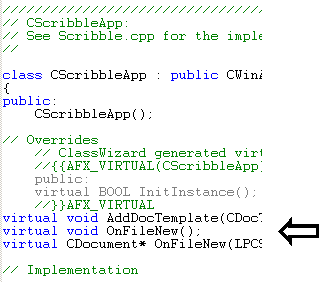
In scribble.h add the following code below the //}}AFX_VIRTUAL line, as shown in Scribble.h.
virtual void OnFileNew();
virtual CDocument* OnFileNew(LPCSTR DocIdent,UINT
nOpCode, UINT nSubCode,DWORD dwData,SECComDoc *pParent);
 \
\ -
In scribble.cpp insert:
void CScribbleApp::OnFileNew()
{
if (m_pDocManager != NULL)
((SECDocManager *)m_pDocManager)->OnFileNew();
}
CDocument * CScribbleApp::OnFileNew(LPCSTR DocIdent, UINT nOpCode,
UINT nSubCode, DWORD dwData, SECComDoc * pParent)
{
if (m_pDocManager != NULL)
return ((SECDocManager*)m_pDocManager)
-> OnFileNew(DocIdent,nOpCode,nSubCode,dwData,pParent);
// NOTE: The pointer to the DocManager must point to an SECDocManager
// object or catastrophic failure will result.
return NULL;
}
-
While still in scribble.cpp find the line
ON_COMMAND(ID_FILE_NEW, CWinApp::OnFileNew) and remove "CWinApp::" so that our new override will be used.
-
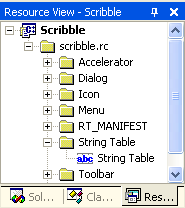
You need to create the document template string itself by inserting an IDR_CHARTTYPE string into the resources. Locate the String Table folder on the Resources tab and open the String Table.
Finding the String Table
-
Click on an empty row at the end of the string table and modify the string ID (IDR_CHARTTYPE) and value:
\nChart\nChart\nChart Files (*.GRP)\n.GRP\nChart.Document\nChart Document
Note: Don't press return until you are finished typing the above text. It will automatically wrap around for you as you type.
-
Insert the following line near the top of scribble.cpp.
#include "ChartScrollView.h"
-
To add the second template declaration in the InitInstance() function, modify the InitInstance() function (in file scribble.cpp) according to the following code:
BOOL CScribbleApp::InitInstance()
{
// Standard initialization
// If you are not using these features and wish to reduce
// the size of your final executable, you should remove
// from the following the specific initialization routines
// you do not need.
#ifdef _AFXDLL
Enable3dControls(); // Call this when using MFC in a shared
// DLL
#else
Enable3dControlsStatic(); // Call this when linking to MFC
// statically
#endif
LoadStdProfileSettings(); // Load standard INI file
// options (including MRU)
// Register the application's document templates. Document
// templates serve as the connection between documents,
// frame windows and views.
CMultiDocTemplate* pDocTemplate;
pDocTemplate = new CMultiDocTemplate(
IDR_SCRIBBTYPE,
RUNTIME_CLASS(CScribbleDoc),
RUNTIME_CLASS(CChildFrame), // custom MDI child frame
RUNTIME_CLASS(CScribbleView));
AddDocTemplate(pDocTemplate);
pDocTemplate = new CMultiDocTemplate(
IDR_CHARTTYPE,
RUNTIME_CLASS(CGraphDoc), // our own ComDoc enable chart
// document.
RUNTIME_CLASS(CMDIChildWnd),
RUNTIME_CLASS(CChartScrollView));
AddDocTemplate(pDocTemplate);
// create main MDI Frame window
CMainFrame* pMainFrame = new CMainFrame;
if (!pMainFrame->LoadFrame(IDR_MAINFRAME))
return FALSE;
m_pMainWnd = pMainFrame;
OnFileNew("Scribb",0,0,0,NULL);
// Enable drag/drop open. We don't call this in Win32,
// since a document file extension wasn't chosen while
// running AppWizard.
m_pMainWnd->DragAcceptFiles();
// Enable DDE Execute open
EnableShellOpen();
RegisterShellFileTypes(TRUE);
// Parse command line for standard shell commands, DDE,
// file open
CCommandLineInfo cmdInfo;
ParseCommandLine(cmdInfo);
// Dispatch commands specified on the command line
if(cmdInfo.m_nShellCommand!=CCommandLineInfo::FileNew)
{
if (!ProcessShellCommand(cmdInfo))
return FALSE;
}
// The main window has been initialized, so show/update it.
pMainFrame->ShowWindow(m_nCmdShow);
pMainFrame->UpdateWindow();
return TRUE;
}
Note: Note that the default behavior is changed in regard to the command-line parameter parsing. To prevent the display of the document-type choice dialog, the application explicitly creates a default Scribble document. If another document type is requested on the command line, the command-line parser creates a new file.


