Sorting a Grid
OBJECTIVE GRID FOR .NET allows you to sort a grid by either columns or rows. This section demonstrates how to enable sorting.
Note: The Sort_CS tutorial, which is located in the Tutorials subdirectory of your OBJECTIVE GRID FOR .NET installation directory, shows how to support sorting when users double-click row or column headers.
Replace the FormLoad() method with the following code:
private void FormLoad(object sender, System.EventArgs e) {
gridControl1.RowCount = 10;
gridControl1.ColCount = 10;
Random r = new Random();
for( uint i = 1; i <= gridControl1.RowCount; ++i ) {
for( uint j = 1; j <= gridControl1.ColCount; ++j ) {
gridControl1[i,j].Style.Value = "" + r.Next(30);
}
}
}
1. In the Form Designer, click the grid and view the grid properties.
2. Locate the EnableHorizontalSorting and EnableVerticalSorting properties in the Param property group, which is in the category GridControl. Set these properties to true.
3. Build and run the application.
4. Double-click the column header labeled “A.” The rows are sorted in ascending order based on each row’s value in column “A.” Sorted Column shows the result.
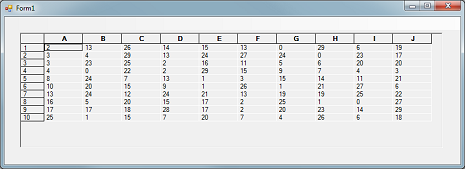
5. Double-click the column header again to resort the values in descending order.
You can programmatically control whether or not the rows or columns can be sorted. Assuming the grid object is called gridControl1:
gridControl1.Param.EnableHorizontalSorting = true;
gridControl1.Param.EnableVerticalSorting = false;
This code fragments allows rows to be sorted and disallows sorting for columns.


