OOXML Excel Library Example
This section illustrates how to use the GridExcelHelper assembly.
Note: The ExcelReadWrite_CS tutorial, which is located in the Tutorials subdirectory of your Objective Grid for .NET installation directory, shows how to read and write Excel files in the grid.
This sample requires the following assembly references in addition to the common System assemblies:
- DocumentFormat.OpenXML
- Stingray.GridControl
- Stingray.GridUtils
- Stingray.GridExcelHelper
The sample illustrates the following Open Office XML operations for an Excel 2007 or higher xlsx file:
- Open or read an existing
xlsxfile into a GridControl on a WinForm - Save changes to an existing and open
xlsxfile - Save as a new
xlsxfile
The xlsx files should be able to be read from Excel 2007 or higher into an Objective Grid for .NET control on a WinForm. This same file, whether from a modified Excel 2007 or higher xlsx file or saved to a new Excel 2007 or higher xlsx file, should also be capable of being read from Excel 2007 or higher.
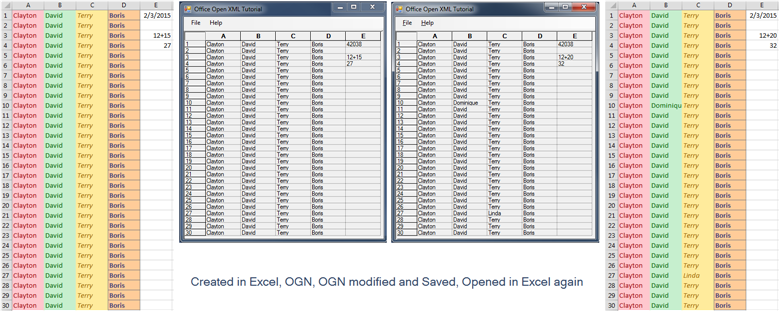
Data modification from and to an xlsx file is available. Data types include numbers as integers, strings, and dates. Formatting and formulae are not interchangeable between the GridExcelHelper assembly and Excel 2007 or higher. For example, if an Excel spreadsheet is created with colored cells, the colors will not appear in the grid control. Also, if an Excel spreadsheet contains a formula, the result (not the formula) will appear in the grid control.
However, every effort has been made to preserve existing Excel formatting and formulae in the Save or Save As implementation. The xlsx XML contains all the original information while only the data values modified within the grid control are saved out to the xlsx and XML file structures. This allows the Excel-generated spreadsheet to maintain it’s appearance and values as illustrated below:
The GridExcelHelper assembly is usable not only with the GridControl, but also with other grids in .NET. The ExcelReadWrite_CLI tutorial, which is located in <stingray-installdir>\Samples\Grid\Excel\ExelReadWrite_CLI, shows you how to read and write Excel files in the MFC version of Objective Grid when the C++ project is built with /clr compiler option.


