




The RCB installation process requires the execution of an installation script (InstallShield on Windows, InstallAnywhere on UNIX). Before you execute the script, ensure that you have a license key file.
Rogue Wave products are licensed individually by module, operating system, and compiler. RCB determines whether a given build is allowed by checking the license.key file. You must have this file to unlock and install your SourcePro C++ products.
For instructions on how to obtain your license.key file, see the ReadMeFirst.pdf file located with your SourcePro installation download.
To install RCB and one or more products, you must use the InstallShield or InstallAnywhere installation scripts.
For installation instructions, see the ReadMeFirst.pdf file located with your SourcePro installation download.
During the installation, you will
Specify where the license file is located.
Select one or more components to install.
Select a location for the buildspace; that is, tell the installation script where you want components to be installed and built.
Specify where to install the RCB application.
A successful installation creates two directory trees:
The RCB application directory tree is the location where you installed the RCB application. In this manual, this directory is represented by the variable rcb_install.
The buildspace directory is the default location for your buildspecs. In this manual, the location of a buildspace is represented by the variable buildspace.
The following example demonstrates the tree structure of the buildspace directory. The buildspace directory in this example contains the Essential Tools Module from SourcePro Core and the Business Analysis and Currency Modules from SourcePro Analysis (with examples).
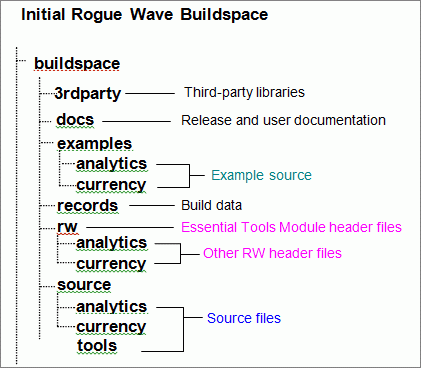
For more information about buildspaces, see Section 2.5.2 and Chapter 4.
If you want to install additional components after the original installation, rerun the InstallShield or InstallAnywhere installation script.
The reinstallation process is like the original installation except that you do not have to reinstall all of RCB. When prompted for the location of the RCB program (already installed), enter the existing rcb_install location.
When reinstalling, you can choose to install into the same or a different buildspace. The re-installing process also allows you to install the same components, different components, or some combination of both.


Copyright © Rogue Wave Software, Inc. All Rights Reserved.
The Rogue Wave name and logo, and SourcePro, are registered trademarks of Rogue Wave Software. All other trademarks are the property of their respective owners.
Provide feedback to Rogue Wave about its documentation.