TRANSPOSE Function
 enabled.
This operation performs best when the system variable !CACHE accurately reflects cache sizes on the host machine.
Usage
result = TRANSPOSE(array)
Input Parameters
array—The array to be transposed. The input array can have any number of dimensions.
Returned Value
result—The transposed array.
Keywords
Dimension—A vector of two integers (n ³ 0) designating the dimensions to transpose. Default: [0,1]
Discussion
TRANSPOSE is used to interchange two dimensions of an array, most commonly the rows and columns of a matrix. For vectors and co-vectors, TRANSPOSE can be used to change from one to the other, but it is more efficient to use REFORM for this purpose.
Example 1
a = INDGEN(2,3)
PM, a
; PV-WAVE prints the following:
;   0       2       4
;   1       3       5
PM, TRANSPOSE(a)
; PV-WAVE prints the following:
;   0       1
;   2       3
;   4       5
Example 2
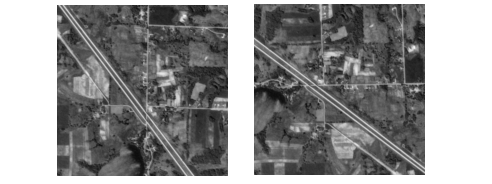
OPENR, lun, !Dir + '/demo/gallery3/data/aerial_demo.img', /Get_lun
aerial_img = BYTARR(512,512)
READU, lun, aerial_img
FREE_LUN, lun
WINDOW, Xsize=512, Ysize=512, /Free, Title='Original Image'
TVSCL, aerial_img
WINDOW, Xsize=512, Ysize=512, /Free, Title='Transposed Image'
TVSCL, TRANSPOSE(aerial_img)
Transposed Image shows what an aerial image looks like before and after applying TRANSPOSE.
|
|
Example 3
a = INDGEN(2, 4, 3)
PM, a
; PV-WAVE prints the following:
; 0       2       4       6
; 1       3       5       7
; 8      10      12      14
; 9      11      13      15
; 16      18      20      22
; 17      19      21      23
PM, TRANSPOSE(a, Dimension=[0,2])
; PV-WAVE prints the following:
; 0       2       4       6
; 8       10      12      14
; 16      18      20      22
; 1       3       5       7
; 9       11      13      15
; 17      19      21      23