Creating Popup Messages
A popup message is
|
|

The WwMessage function is used to
Blocking vs. Nonblocking Windows
A message window can be blocking or nonblocking. Blocking means that no other user action can occur until the message or dialog is confirmed—user clicks on OK—or the message box is dismissed. The blocking window “blocks” the user from performing other actions as long as the window remains on the screen.
A nonblocking message window can remain on the screen while the user performs other actions. The nonblocking dialog or message does not “block” the user from performing other actions.
The WwMessage function has a Block and a Nonblock keyword. Use the Block keyword to create a blocking window and the Nonblock keyword to create a nonblocking window.
Types of Message Windows
You can create four types of message boxes. These types are available only with the Motif message widget. They are shown in Message Windows. Clockwise from upper-left: Information, Working, Question, and Warning.
Information message—Specified with the Info keyword.
Working message—Specified with the Working keyword.
Warning message—Specified with the Warning keyword.
Question message—Specified with the Question keyword.
|
|
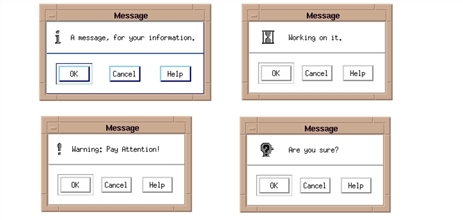
Default Message Box Buttons
By default, three buttons appear along the bottom edge of message windows. They are used to confirm or cancel the message.
Motif Buttons
OK—Confirms
Cancel—Cancels the message.
Help—Not supported.
Message Box Example
This example creates a row of buttons you can click on to display the four different types of Motif message boxes. To run the example, enter the callback procedures in a file and compile them with the .RUN command. Then enter the widget commands at the WAVE> prompt. The result is shown in Pop-up Message.
Callback Routines
PRO MessageOK, wid, data
print,'Message OK'
END
PRO MessageCancel, wid, data
print,'Message Cancel'
END
PRO MbuttonCB, wid, data
case data of
 1: message=WwMessage(wid, $
'This is a Test Message','MessageOK', $
'MessageCancel',TITLE='Information')
 2: message=WwMessage(wid, $
'This is a Test Message','MessageOK', $
'MessageCancel', /Working, $
TITLE='Working')
 3: message=WwMessage(wid, $
'This is a Test Message','MessageOK', $
'MessageCancel', /Warning, TITLE='Warning')
 4: message=WwMessage(wid, $
'This is a Test Message','MessageOK', $
'MessageCancel', /Question, TITLE='Question')
ENDCASE
END
Widget Commands
top=WwInit('ww_ex14', 'Examples', layout)button=WwButtonBox(layout, ['Information', $
'Working', 'Warning', 'Question'], 'MbuttonCB')
status=WwSetValue(top, /Display)
WwLoop