Defining Your Own Projections
You can specify a new projection by creating a PV‑WAVE procedure defining the projection algorithm. Then, call MAP and specify the name of your projection routine with the User keyword. The projection routine is passed a single parameter, values, a 2-by-n floating point array of longitude/latitude values to be transformed and returned in the same array.
A second parameter, index, must also be included, but its use is optional. On return index can contain a vector of integers specifying the indices in the values array to plot. If index is not used, it is assumed that all projected points in values are valid.
In addition a keyword parameter Reverse must be defined so that if the procedure is called with Reverse, the data can be passed through a reverse transformation from two-dimensional data coordinates to longitude/latitude values. The system variables !Map.Center and !Map.Parameters also may be used in a user defined procedure to supply other necessary information for the projection algorithm.
When the MAP procedure is called, a new system variable !Map is created to contain parameters used by the mapping routines. These parameters are also used in user defined projections and user-defined map dataset procedures. For information on the fields of this system variable, refer to the file map.pro in:
(UNIX) $RW_DIR/mapping-2_0/lib
(WIN) %RW_DIR%\mapping-2_0\lib
Example
An example user-defined projection is provided in:
(UNIX) $RW_DIR/mapping-2_0/demo/userproj.pro
(WIN) %RW_DIR%\mapping-2_0\demo\userproj.pro
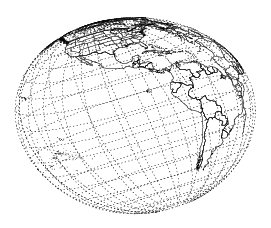
This example projection program produces a tilted perspective (modified azimuthal) projection. Use this program to guide you in writing your own projection procedures.
Here is an example map produced with the “user-defined” projection userproj.pro. The results are shown in User-Defined Projection.
MAP, Center=[-74, 41], Zoom = 2, /Gridlines, Gridstyle = 1, $
    Gridcolor = 15, User = 'userproj', $
    Parameters = [10.0, 200.0, 20.0]
|
|