IBM 3270
HostAccess supports IBM 3270 emulation, over all supported TCP/IP networks.
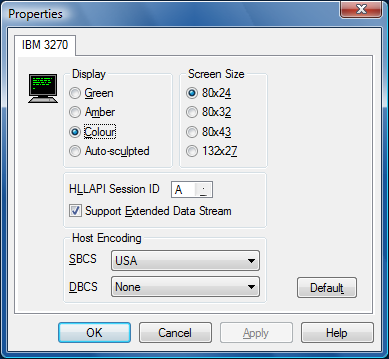
Select your screen and display options as follows:
| Display | Green or Amber for a monochrome green/amber display, or Colour for a full-colour display. Select Auto-sculpted to automatically produce a sculpted display to give a GUI look to your applications. |
|
Screen size |
To define an alternate screen size for applications which support it, select the required option in the Screen size section. The normal screen size is always 80x24. The screen sizes correspond to the IBM 3278 terminal, models 2,3,4 and 5 respectively. |
|
HLLAPI Session ID |
This allows you to select the session ID for your HLLAPI application to communicate with HostAccess. |
|
Support Extended Data Stream |
If selected, this will enable extended character highlighting. A mainframe user would generally check this box, but an AS/400 user using 3270 will need to clear this box. |
|
Host Encoding |
Host encoding refers to the “nationality” of the terminal and changes the codepage to be used for displaying the data. It can be changed dynamically, which can be useful in a multi-national configuration where a user might log in to one mainframe in a particular country via another mainframe in a different country. Select the required SBCS (Single Byte Character Set) for European characters or DBCS (Double Byte Character Set) for Far Eastern characters. |
You can use your mouse pointer to activate function keys at the bottom of the terminal screen. For example, if the text ”F1=Help” appears on the screen, move your mouse pointer over it and click the right mouse button to activate that function.
You can also position your cursor anywhere on the screen by moving your mouse pointer to where you want the cursor to be then clicking the left mouse button.
To use Pg Up & Pg Dn for PF7 & PF8 (Roll Down and Roll Up), select the Terminal option from the Configure menu, and select the Remote Page Keys option.