The --add option for the qacli project files command is very versatile. For example, the following command will add the file file.c to a Perforce QAC project along with its compile dependent information, the include path and the definition1:
qacli project files -P C:\path\to\QAFproj --add -- /IC:\workspace\inc/DMYMACRO=1 C:\workspace\src\file.cThe --add option will parse all data that follows it and extract any compile dependent information within that data.
Another way of using this feature is to use the operating systems tools to automatically add all files in a given directory structure. On Unix-like systems, this is quite simple:
This will add all files with a .c extension in the directory tree rooted at the current directory. The equivalent on Windows operating systems is as follows:
This approach will not add any of the compile-dependent data for those files. This can be done manually by opening the QA Project Properties user interface for the Perforce QAC project in question and selecting the analysis component that you wish to use to add the information. For the C language, select the C Source Language toolchain and qac analysis component.
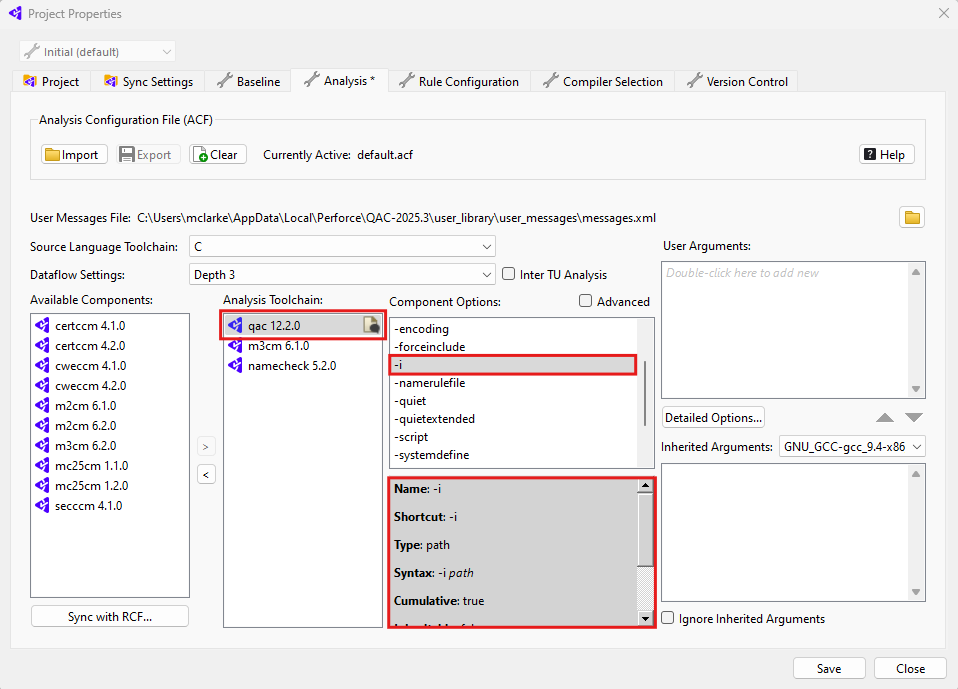
Likewise for the C++ language, choose the qacpp analysis component.
Include Paths and Definitions can be added using the following options, respectively:
- Analysis tab : select-analysis-component :
-i - Analysis tab : select-analysis-component :
-d
This will add Include Paths and Definitions for all files for a specific source language.
Adding Include Paths and Definitions for a specific source file can also be done through QA·GUI by selecting the source file in the file/folder tree and editing the properties at the bottom of the Files view.
Once you click the Edit button on the right of one of the highlighted fields, a text window opens up so that you can specify the particular path or definition.