Streams icons and indicators
Streams in P4V help you organize development work by defining how changes flow between streams, including rules for views and inheritance. Icons help you visually identify stream types and inheritance.
On this page:
Stream types
Stream type icons indicate the stream type wherever streams are displayed, such as on the Streams tab, in the Streams Graph, and in stream lists or trees. To learn more, see Stream types.
| Icon | Stream type |
|---|---|
|
|
Release |
|
|
Mainline |
|
|
Development |
|
|
Sparsedev |
|
|
Sparserel |
|
|
Task |
|
|
Virtual |


Stream specification and inheritance
Visual indicators show whether a stream inherits its view from the parent stream or defines its own view.
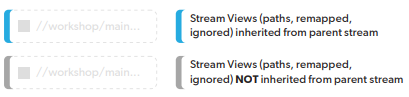
To learn more, see Stream specification and inheritance.