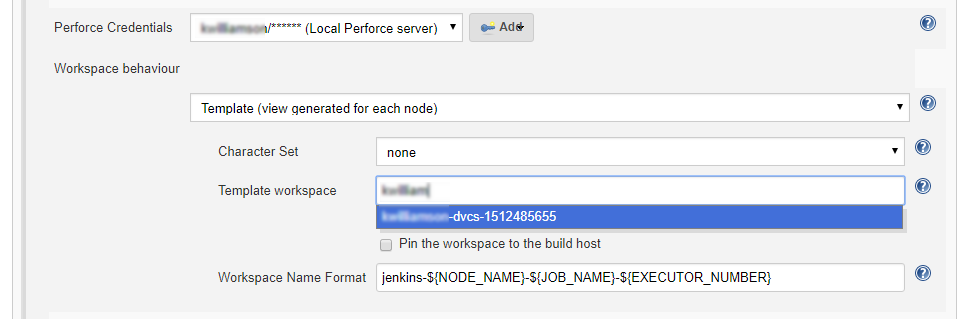
Template workspace
Template workspaces use a predefined template to generate the workspace view. The name of the workspace is generated using the Workspace Name Format field. Use template workspaces when working with Matrix builds.
- In Workspace behaviour, ensure that Template (view generated for each node) is selected.
- Use Character Set to set the character set used by Jenkins when syncing files from the PerforceP4 Server. This should be set to none unless the workspace is connected to a Unicode enabled P4 Server.
- In Template workspace: select an existing Perforce workspace that will be used to create or update the Jenkins build workspace. If you are connected to a P4 Server, existing workspaces will be auto suggested as you type.
- (Optional) Select Pin the workspace to the build host to restrict the workspace to a specific agent. You do not always need to select this option, as including
${NODE_NAME}in the workspace name already ensures each agent uses a unique workspace. -
In Workspace name, enter a unique name for the manual workspace. Each Jenkins agent node must use a distinct Perforce workspace. The name is generated using a format string that substitutes predefined variables. You must include at least one variable, but it's recommended to use the following as a minimum:
jenkins-${NODE_NAME}-${JOB_NAME}-${EXECUTOR_NUMBER}
For more information about variables, see Variable Expansion
Pipeline:
- Use a unique workspace name for the Jenkinsfile that will not get reused by the sync steps in the script. A postfix of -script will help to identify the workspace's use and make it unique from code sync steps.
-
Variables in the script for the workspace name must be surrounded by single quotes as shown:
name: 'jenkins-${NODE_NAME}-${JOB_NAME}-${EXECUTOR_NUMBER}',
Using full double quotes " expands the variables early and the script will fail.