Example workflows
These example configurations for common review workflows show how specific rule settings can be combined to support different development practices.
On this page:
Pre‑commit review workflow
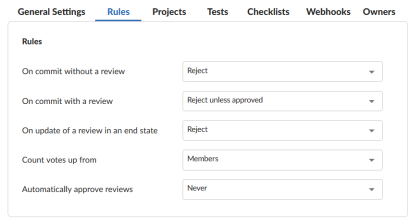
A pre-commit review workflow requires all changes to be reviewed and approved before they can be submitted. This approach is typically used on codelines that require stricter control, such as main or release branches.
Configuration
Set the following rules to:
-
On commit without a review: Reject
Prevents submitting changelists that do not have an approved review.
-
On commit with a review: Reject unless approved
Requires the associated review to be approved and ensures the submitted changelist matches the approved content.
Post‑commit review workflow
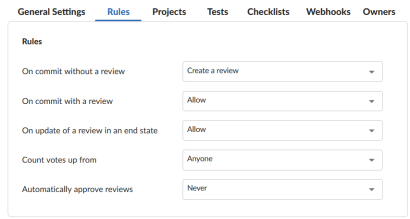
A post-commit review workflow allows users to submit their work first, then create or attach a review afterwards. This is useful for fast-paced development branches where rapid iteration is preferred.
Configuration
Set the following rules to:
-
On commit without a review: Create a review
A review is automatically created for each submitted changelist.
-
On commit with a review: Allow
Permits submission of changelists already associated with a review.
Restrictive project workflow with a less restrictive development branch
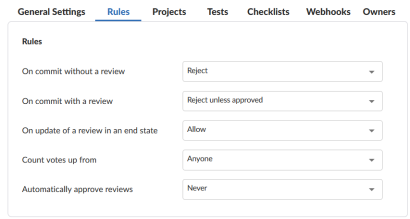
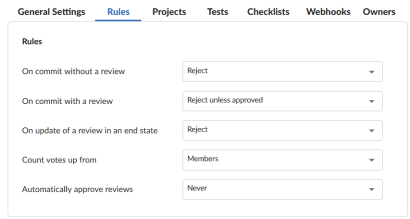
In this example, a project's release and main branches need a restrictive workflow to protect the codelines. All submissions must have an associated approved review and the content of the changelist must be identical to the content of the approved review.
The development branch can be less restrictive, allowing new features to be integrated quickly, with reviews occurring after changes have been committed. For this branch, all submitted changelists must still have an associated code review.
Project workflow configuration (restrictive):
-
On commit without a review: Reject
Ensures that changelist cannot be submitted without an approved review.
-
On commit with a review: Reject unless approved
Ensures that if a changelist already has an associated review, that review is approved and the content of the changelist is identical to the content of the approved review.
-
On update of a review in an end state: Reject
Prevents updates to reviews in and end state by automatically rejecting any changes made. Protected end states are defined by the administrator. See Protected end states.
-
Count votes up from: Members
Only votes from project members are counted toward the Minimum up votes set on projects/branches.
-
Automatically approve reviews: Never
Ensures that reviews are not automatically approved.
Development branch workflow (less restrictive):
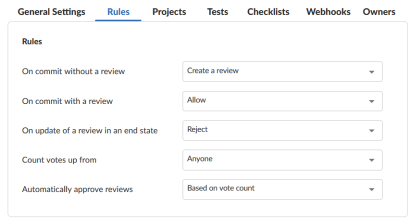
-
On commit without a review: Create a review
Ensures that all submitted changelists have a review.
-
On commit with a review: Allow
Enables changelists that already have an associated review to be submitted.
-
On update of a review in an end state: Reject
Prevents updates to reviews in and end state by automatically rejecting any changes made. Protected end states are defined by the administrator. See Protected end states.
-
Count votes up from: Anyone
Ensures that votes of all reviewers are counted toward the Minimum up votes set on projects/branches.
-
Automatically approve reviews: Based on vote count
Automatically approves a review when all of the review requirements have been satisfied.
Project workflow with a more restrictive release branch workflow
In this example, the project uses a post‑commit workflow to support rapid development, while the release branch applies a stricter pre‑commit workflow to protect the stability of the release codeline.
The project workflow allows users to submit changes first, then create or update reviews afterward. The release branch, however, requires all submissions to go through an approved review and for the submitted content to match the approved version.
Project workflow configuration (rapid development):
This is for the workflow for the project and its branches.
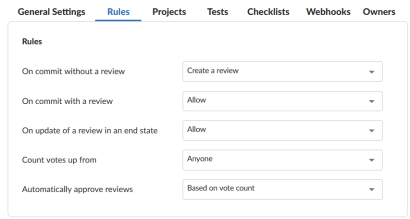
-
On commit without a review: Create a review
Makes sure that all submitted changelists have a review.
-
On commit with a review: Allow
Allows submission of changelists that already have a review.
-
On update of a review in an end state: Allow
Allows updates to reviews that are in end states
-
Count votes up from: Anyone
Votes from all reviewers are considered when evaluating the Minimum up votes set on projects or branches.
-
Automatically approve reviews: Based on vote count
Reviews are approved automatically when all requirements are met.
Release branch workflow configuration (strict):
Defines the workflow for the release branch only. This workflow overrides the project's settings.
-
On commit without a review: Reject
Prevents submitting changelists that do not have an approved review.
-
On commit with a review: Reject unless approved
Requires the review to be approved and ensures the submitted changelist matches the approved content.
-
On update of a review in an end state: Reject
Blocks updates to reviews that are in end states. End states are configured by the administrator.
-
Count votes up from: Members
Only votes from members of the associated project count toward Minimum up votes.
-
Automatically approve reviews: Never
Reviews must be approved manually.