Security (System information)
The Security tab provides access to encryption settings used to protect sensitive credentials stored by P4 Code Review.
Administrators can use this tab to manage encryption keys, configure where encryption keys are stored, and enable encryption for supported modules. When encryption is enabled, sensitive credentials are encrypted before they are stored and are automatically decrypted when required by P4 Code Review.
P4 Code Review supports encryption at rest for selected credentials, including AI vendor API keys and Slack integration tokens. Encrypted credentials remain available for normal application use but cannot be viewed directly from storage.
Before enabling module encryption, configure a key source and generate at least one encryption key.
Backup and recovery
Encryption keys must be preserved as part of your P4 Code Review backup and recovery strategy.
Losing encryption keys can prevent encrypted credentials from being decrypted. If encryption keys are stored on the local filesystem, ensure that the encryption key directory and the associated P4 Code Review data are included in your backup procedures.
Encryption keys must be preserved as part of your P4 Code Review backup and recovery strategy.
For details, see Prepare for disaster recovery.
Encryption key versions
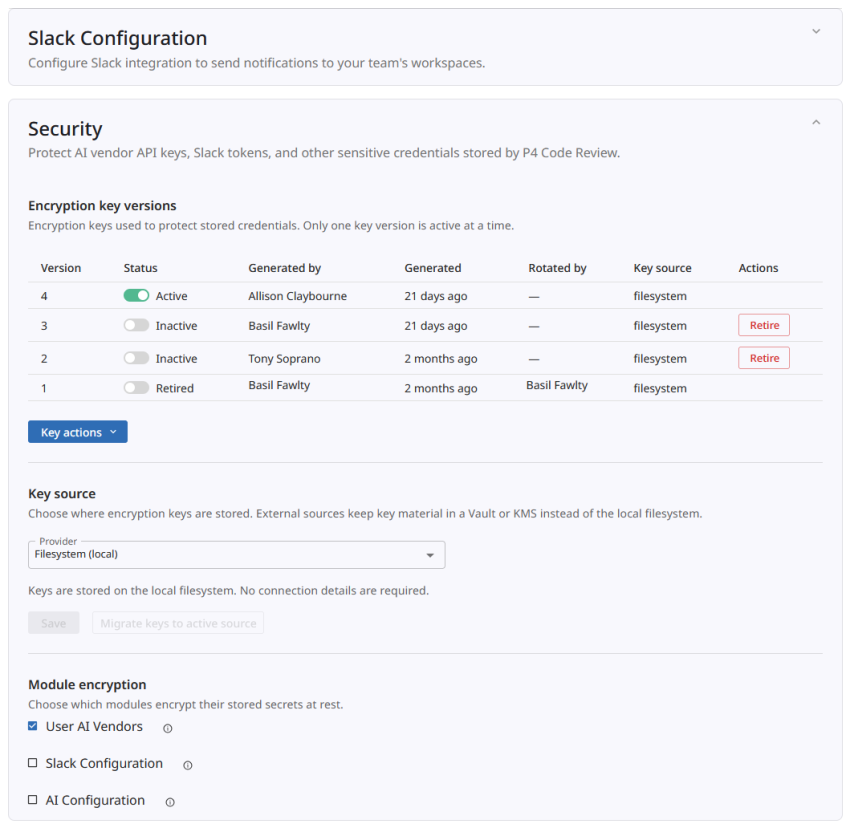
The Encryption key versions section displays the encryption keys available to P4 Code Review.
Only one key version can be active at a time. The active key is used to encrypt newly stored credentials. Older key versions are retained so that existing encrypted credentials can continue to be decrypted after key rotation.
When encryption is enabled, the active encryption key is automatically rotated approximately every six months. During automatic rotation, a new key version is generated and becomes the active key. Previous key versions are retained so that existing encrypted credentials can continue to be decrypted.
For each key version, the table displays:
-
Version number
-
Status
-
User who generated the key
-
Generation date and time
-
User who performed key rotation, if applicable
-
Key source
-
Available actions
Key statuses
-
Active: Used to encrypt newly stored credentials.
-
Inactive: No longer used to encrypt new credentials but remains available to decrypt existing encrypted credentials.
-
Retired: The key has been retired and is no longer active.
Key Actions
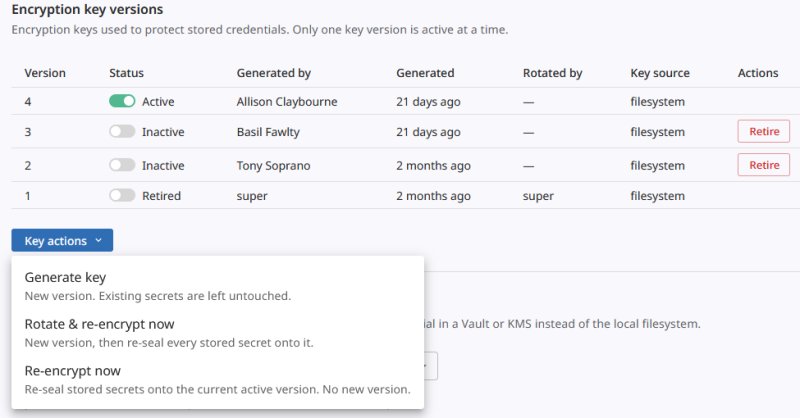
Use Key actions to manage encryption keys:
-
Generate key: Creates a new encryption key version and makes it the active key for newly encrypted credentials. Existing encrypted credentials are not modified.
-
Rotate & re-encrypt now: Creates a new encryption key version, makes it active, and re-encrypts existing encrypted credentials using the new key. Use this action when rotating credentials to a new encryption key.
-
Re-encrypt now: Re-encrypts existing encrypted credentials using the current active key without creating a new key version. Use this action after changing key-storage settings or when migrating encryption keys between key sources.
-
Retire key: Retires an inactive key version when it is no longer required. A key cannot be retired while it is active or while encrypted credentials still depend on it.
In addition to automatic rotation, administrators can generate a new key version at any time if they believe an encryption key has been compromised or exposed.
Recommended setup sequence
To enable encryption for stored credentials:
-
Configure a key source.
-
Generate an encryption key.
-
Enable encryption for one or more supported modules.
-
Verify that the encrypted modules continue to function correctly.
-
Include encryption keys in your backup and recovery procedures.
Key source
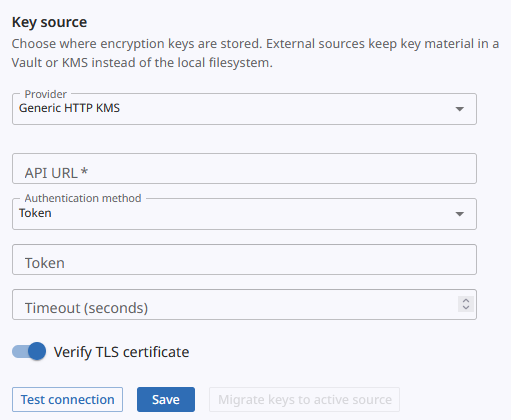
The Key source section controls where encryption keys are stored.
By default, P4 Code Review stores encryption keys on the local filesystem.
Alternatively, administrators can configure an external key management service, such as HashiCorp Vault or a supported Key Management Service (KMS), to store encryption keys outside of P4 Code Review.
After configuring a key source, use Test connection to verify connectivity before saving the configuration.
After changing the key source, use Migrate keys to active source to migrate existing encryption keys to the currently configured key source. This operation re-wraps or re-stores existing key material in the new key source without changing the encrypted credentials themselves.
Module encryption
The Module encryption section controls which P4 Code Review modules encrypt stored credentials at rest.
Supported modules include:
-
User AI Vendors: Encrypts user-specific AI vendor credentials.
-
AI Configuration: Encrypts administrator-managed AI vendor credentials.
-
Slack Configuration: Encrypts Slack integration credentials.
When module encryption is enabled, credentials saved for that module are encrypted automatically and remain available for normal application use without additional user interaction.
Existing plaintext credentials continue to function. Credentials are encrypted when they are saved or updated after encryption is enabled.
After encryption is disabled, administrators or users might need to re-enter credentials for the affected module before they can be used again.