Troubleshooting Jenkins configuration issues
If you experience issues connecting to Jenkins from Perforce ALM, check to make sure that:
- The Jenkins instance is running.
- The URL for the Jenkins instance configured in ALM starts with http:// or https:// and is correct.
You may need to contact your Jenkins administrator for additional help.
On this page:
Certificate issues
When you test the connection to a Jenkins instance from ALM, you may be prompted that the connection failed and the certificate returned from Jenkins is not trusted.
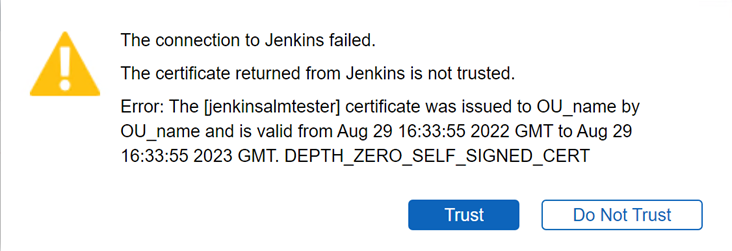
You must generate an SSL certificate to run Jenkins over HTTPS. If the certificate is not generated by a certificate authority, is expired, or uses an unsecured algorithm, the networking layer rejects the request between ALM and Jenkins and you are prompted about the certificate.
- If the certificate displayed in the dialog box is correct for your installation, click Trust. ALM accepts the Jenkins connection request and remembers the certificate.
- If the certificate information is incorrect or you are unsure, click Do Not Trust to prevent possible man-in-the-middle attacks. Ask your Jenkins administrator for help with generating a valid certificate and then configure the Jenkins connection again.
- If errors persist after clicking Trust or if you click Do Not Trust, you must make changes before ALM can connect to Jenkins. See the knowledge base for information.